
MuleSoft MCP: Tutorial, Best Practices & Examples
The Model Context Protocol (MCP) is an open protocol that enables large language model (LLM) applications to interact with external systems in a structured way. It defines how tools are described, discovered, and invoked, allowing AI applications to perform actions reliably.
MuleSoft MCP implements this protocol using Mule applications to expose enterprise capabilities as MCP-compatible tools. By leveraging MuleSoft’s integration platform, you can build MCP servers that are scalable, governed, and production-ready. This approach allows you to extend existing integrations for AI-driven use cases without rearchitecting your systems.
This article explains how MCP operates and how MuleSoft can be leveraged to develop AI-ready applications.
Summary of key concepts of MuleSoft Model Context Protocol
Introduction to MuleSoft MCP
The Model Context Protocol (MCP) is an open-source standard that enables AI applications to connect to external systems and tools. Using MCP, LLMs can connect to various data sources—including databases, external systems, and workflows—enabling them to perform tasks via natural-language prompts.
You can think of MCP as a standardized language that instructs LLMs on how to utilize external tools correctly. Here is a simple diagram that provides an overview of how MCP connects AI applications to external data sources.
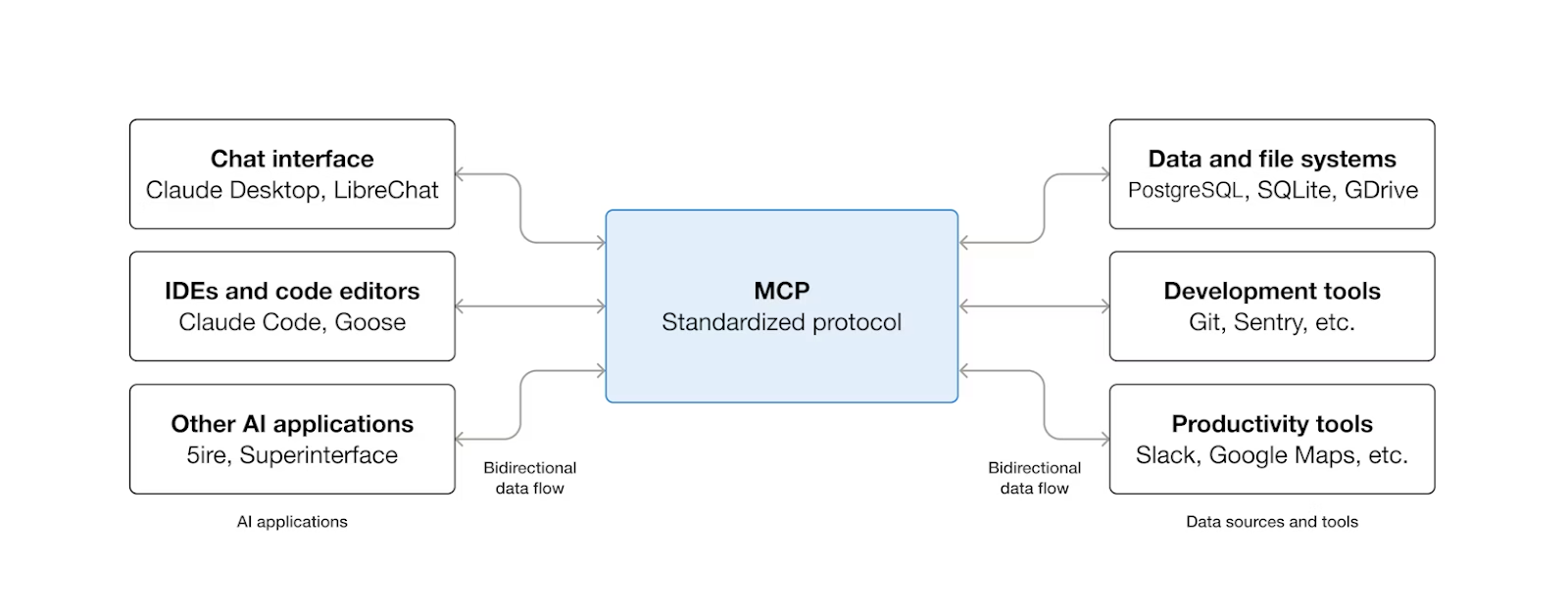
This diagram shows MCP as a common connector that enables AI apps to talk to the tools and data people already use. Instead of every app building custom integrations, MCP provides a shared way for chat tools, coding environments, and other AI systems to safely send and receive information from databases, developer tools, and productivity apps.
{{banner-large-graph="/banners"}}
Core components of the MCP ecosystem
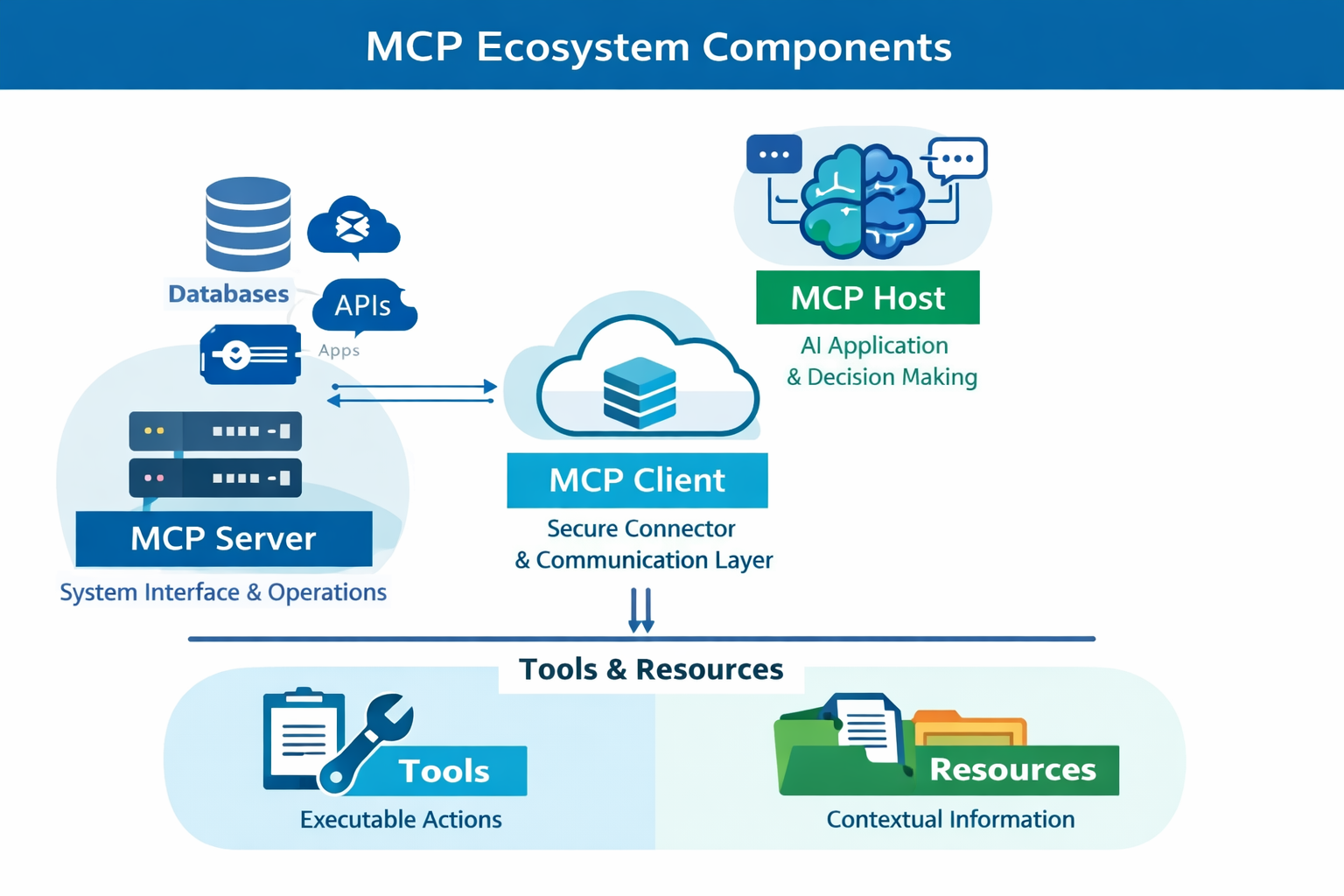
To enable structured interaction within the MCP ecosystem, MCP is built with a small set of defined components, each with a clear responsibility. These components work together to separate AI decision-making from system access, communication, and execution.
MCP server
The MCP server is the core component of the MCP ecosystem, providing context and capabilities to AI applications. It exposes data, APIs, or business operations in a standardized MCP format that AI applications can consume and reason over, leveraging the information.
This is the component layer that interacts with end systems (such as databases, APIs, and external enterprise applications) and exposes MCP functions to perform operations, while maintaining secure, controlled access for MCP clients.
MCP host
The MCP host is the AI application itself. This is the layer responsible for managing conversations, interpreting and reasoning about prompts and responses, and determining when to perform an action on the MCP server. The host doesn’t connect to the end systems directly but relies on the MCP client and server to access data and capabilities. In simple words, this layer is the brain of the MCP ecosystem.
MCP client
The MCP client is the connector between AI applications and MCP servers. This layer maintains a secure connection between the host and the server, fetching context, data, and available actions for the AI host to use. The client ensures that the AI application does not require an understanding of the complexities or technical details of the backend system. This layer acts as the communication layer of the MCP ecosystem.
Tools and resources
Tools are executable actions that the AI application can invoke to perform different actions on the MCP server. These actions enable the AI application to answer user-specific questions in context and also perform actions on the user's behalf. For example, an MCP server that exposes tools for creating a ServiceNow ticket can be integrated with an AI application. Users can then report issues directly to the AI application, which can create a ServiceNow ticket using the MCP server tool based on the details provided by the user.
Resources provide information that the AI application can read and use as context. These can include customer data, order details, documents, or reference information. They help the AI layer generate accurate and relevant responses.
MuleSoft MCP communication channels
MCP communication channels are part of the Transport Layer and manage channel and authentication between clients and servers. They handle connection establishment, message framing, and secure communication among participants in the MCP ecosystem. Different transport types exist to support both local and distributed deployment models.
STDIO transport
Standard input/output (STDIO) transport is intended for local, tightly coupled deployments. In this model, the MCP server runs as a local process and communicates with the MCP client through standard input and output streams.
Since both components operate on the same machine, communication occurs without network overhead, and no additional networking or security configuration is required. This makes STDIO transport well-suited for local development, testing, and early-stage implementations where simplicity and direct process communication are preferred.
Streamable HTTP transport
Streamable HTTP transport is built for remote and distributed environments. Here, the MCP client communicates with the MCP server over HTTP, allowing the server to be hosted independently, such as in the cloud or within MuleSoft’s runtime. The streamable nature of this transport enables responses to be sent incrementally, which improves responsiveness for long-running operations. This transport suits enterprise and cloud-native architectures that require scalability, security, and network-based access.
Key benefits of using MuleSoft MCP
MuleSoft offers a secure, straightforward approach to transforming and adapting existing applications into AI-enabled applications, with support from MCP. Let’s discuss the key features that MuleSoft provides with MCP.
The diagram below provides an overview of how MuleSoft’s MCP support enables interactions among various AI Agents and enterprise data systems, such as SAP, Salesforce, and Databases. The MCP layer in between the AI agents and the systems acts as a bridge, translating AI-friendly MCP requests into executable flows in the MuleSoft applications.
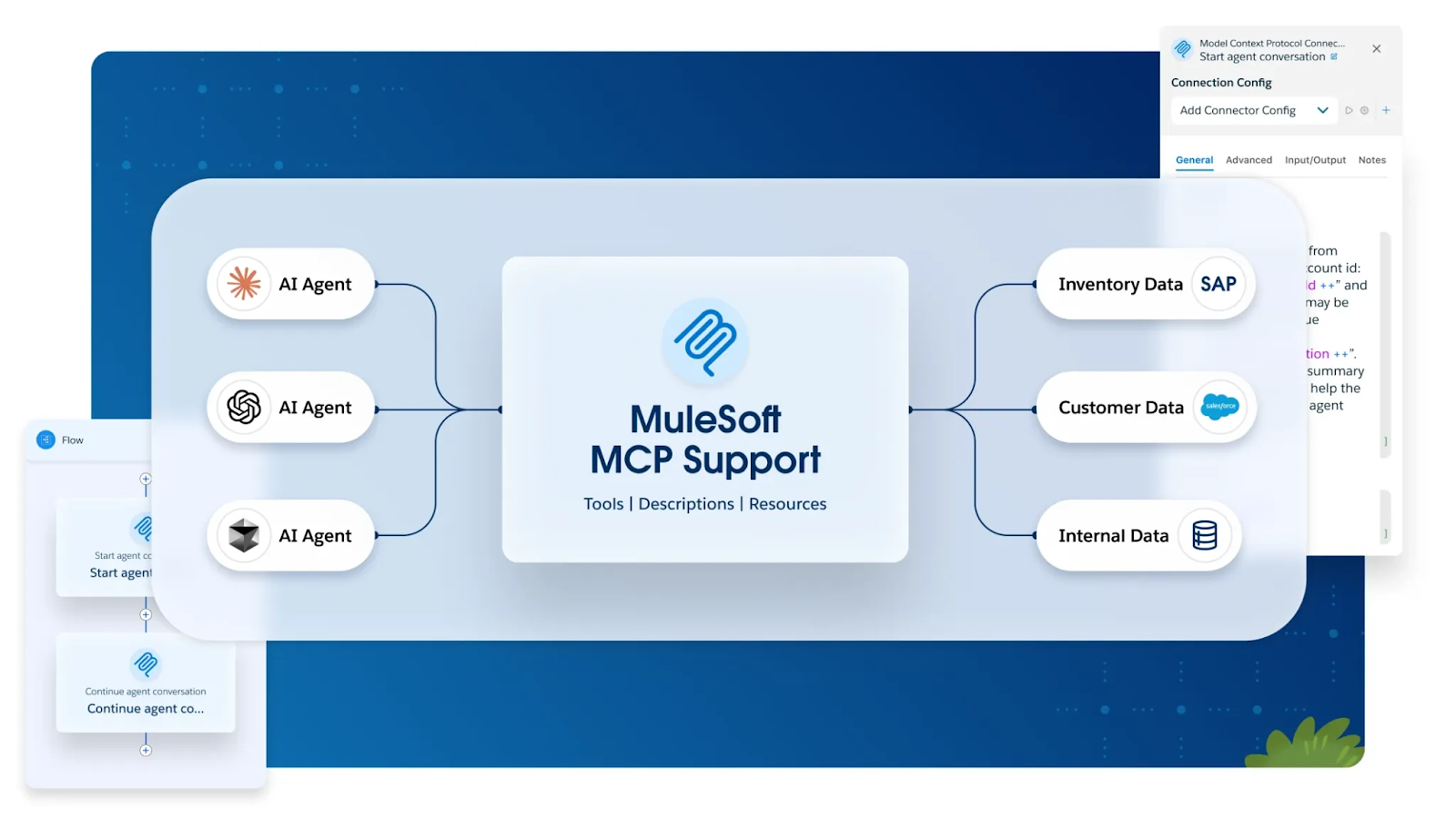
The following section discusses some of the key benefits of using MuleSoft’s MCP capabilities to develop AI-ready applications:
- Connector-based MCP implementation: The greatest advantage of MuleSoft MCP is that it enables any MuleSoft-managed API or integration to be exposed as an MCP server. MuleSoft provides an out-of-the-box MCP connector that enables existing applications to become AI-ready with minimal effort.
- Broad system and connector coverage: Using MuleSoft’s MCP capabilities and the vast ecosystem of connectors, you can integrate any system with AI applications. For example, an organization can add an MCP layer over its finance systems, such as NetSuite, and expose them to AI applications to generate insights and perform other actions.
- Built-in security and authorization enforcement: Using MuleSoft ensures that systems have the correct authorization methods in place, allowing them to access only the information to which they are authorized. It also controls what data and information should be exposed from downstream systems, ensuring that important and sensitive data never leaves the system.
- Support for synchronous and streaming responses: MuleSoft MCP supports both short-running operations that return immediate responses and long-running operations that stream partial results. This flexibility allows AI applications to handle real-time updates, progressive reasoning, and large or complex operations efficiently.
- Scalability and runtime management: MCP servers run as standard Mule applications, benefiting from MuleSoft’s runtime scalability, high availability, monitoring, and lifecycle management. MCP workloads scale using the same infrastructure used for other enterprise integrations.
- Observability and auditing: All MCP interactions can be logged and monitored using MuleSoft’s built-in observability features. Metrics, logs, and audit records provide visibility into AI-driven access patterns, tool usage, and system behavior for operational and compliance purposes.
MCP lifecycle with MuleSoft
The MCP lifecycle begins with MuleSoft exposing enterprise data and operations as governed MCP tools and resources. The AI application uses this context to determine which information is available and which actions are allowed, then makes a decision and invokes the required tool to perform the action. The MuleSoft application (MCP server) then securely processes the request, interacts with backend systems, and returns the result to the AI application, completing the end-to-end MCP flow.
The following diagram provides a visual overview of the MCP interaction lifecycle, showing how an AI application, MCP client, MuleSoft MCP server, and enterprise systems work together from initial connection through session termination. It illustrates the sequence of steps involved – such as server initialization, session creation, tool discovery, invocation, response handling, and cleanup – that are described in detail in the sections that follow.
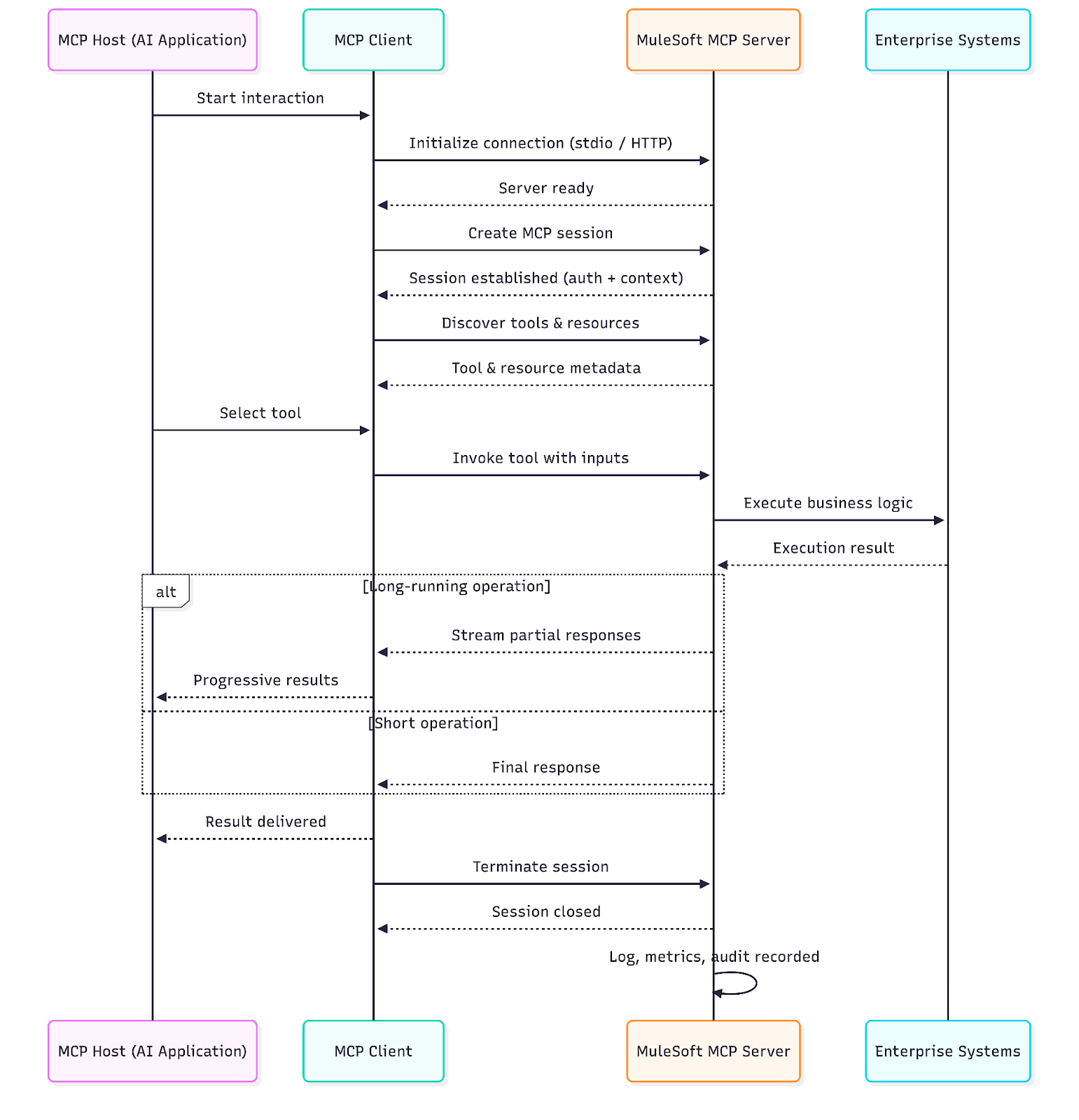
Each phase in the diagram corresponds to a lifecycle stage explained below, helping connect the conceptual flow to its implementation in MuleSoft.
MCP server initialization
The lifecycle begins with a MuleSoft application that exposes MCP tools and resources and connects to downstream applications. The MuleSoft application ensures that exposed data is reviewed, approved, secured, and governed, enabling systematic, authorized access to AI applications.
The exposed MCP server operates within the MuleSoft ecosystem, similar to other Mule applications; however, it differs in how it communicates with its clients. Instead of exposing traditional REST or SOAP APIs intended for direct consumption by external systems, the MCP server communicates via the Model Context Protocol (MCP), designed for structured, bidirectional interactions with AI agents or tools. This communication model emphasizes contextual exchange, tool invocation, and stateful interactions rather than stateless request–response patterns, enabling tighter integration with AI-driven workflows while still leveraging MuleSoft’s runtime, security, and governance capabilities.
Session creation and management
A session is created when the MCP Host connects to the MuleSoft Server through an MCP client. The client establishes the transport connection (STDIO or streamable HTTP), after which MuleSoft authenticates the request and authorizes access based on defined policies. The MCP client maintains the session context, including identity, permissions, and active tools.
Tool discovery
Once the session is created, the MCP client requests available tools and resources from the MuleSoft Server. MuleSoft provides a set of structured, governed tools, along with their input and output schemas, that outline the available input parameters for interacting with the tools and the response parameters returned by the tools. All this information helps the AI application understand which actions it can perform on the MCP server and what information it needs to perform them.
The intelligent part of handling user prompts and reasoning over responses from the MCP server is handled by the AI application.
Tool invocation and response handling
At this point, the AI application understands the operations from the MCP server and how to interact with it. Based on the user prompts, the MCP Host selects a tool based on its reasoning and invokes it through the MCP client. MuleSoft receives the invocation, validates inputs, applies runtime policies, and orchestrates the required backend systems to execute the business logic.
After a tool is executed, MuleSoft sends the results back to the MCP client in a structured MCP response format. For short-running operations, the response is returned as a single payload. For long-running, data-intensive, or multi-step processes, MuleSoft can stream responses incrementally, allowing the AI to consume partial results as they become available. This approach enhances perceived responsiveness, facilitates progressive AI reasoning, and reduces end-user wait times while maintaining full security and governance.
Session termination
Once the AI interaction is complete, the MCP client explicitly closes the session. MuleSoft then cleans up all session-related state, terminates active connections, and releases allocated resources. At the same time, MuleSoft captures detailed logs, metrics, and audit records for monitoring, troubleshooting, security review, and compliance, ensuring full visibility and traceability of AI-driven interactions.
{{banner-large="/banners"}}
Building, deploying, and testing an MCP server
Let’s build an MCP server from scratch using the MuleSoft MCP connector. MuleSoft’s implementation of MCP makes it extremely easy to get started and start building Model Context Protocol servers.
We’ll use an example of building a simple flow that allows users to access an AI application and ask questions about opportunities in Salesforce. For example, a user can ask the AI application to return a list of opportunities that are In Progress and have a minimum value of $1,000. The AI application interprets the user's request and triggers the corresponding action on the MuleSoft MCP server. Once the MCP server returns the list of opportunities, the AI application decides how to display them to the user.
This simple flow involves an AI agent (in this example, ChatGPT) that intelligently reasons over the user's prompts, triggers the appropriate action, and displays the information back to the user. The MCP server, built on MuleSoft, processes requests from the AI agent. The MCP inspector is used to test the MCP server before it is connected to the AI agent.
Building an MCP server in MuleSoft
- Create a new flow and set the flow source to the MCP server - Tool Listener. This operation exposes a new MCP tool to the client.
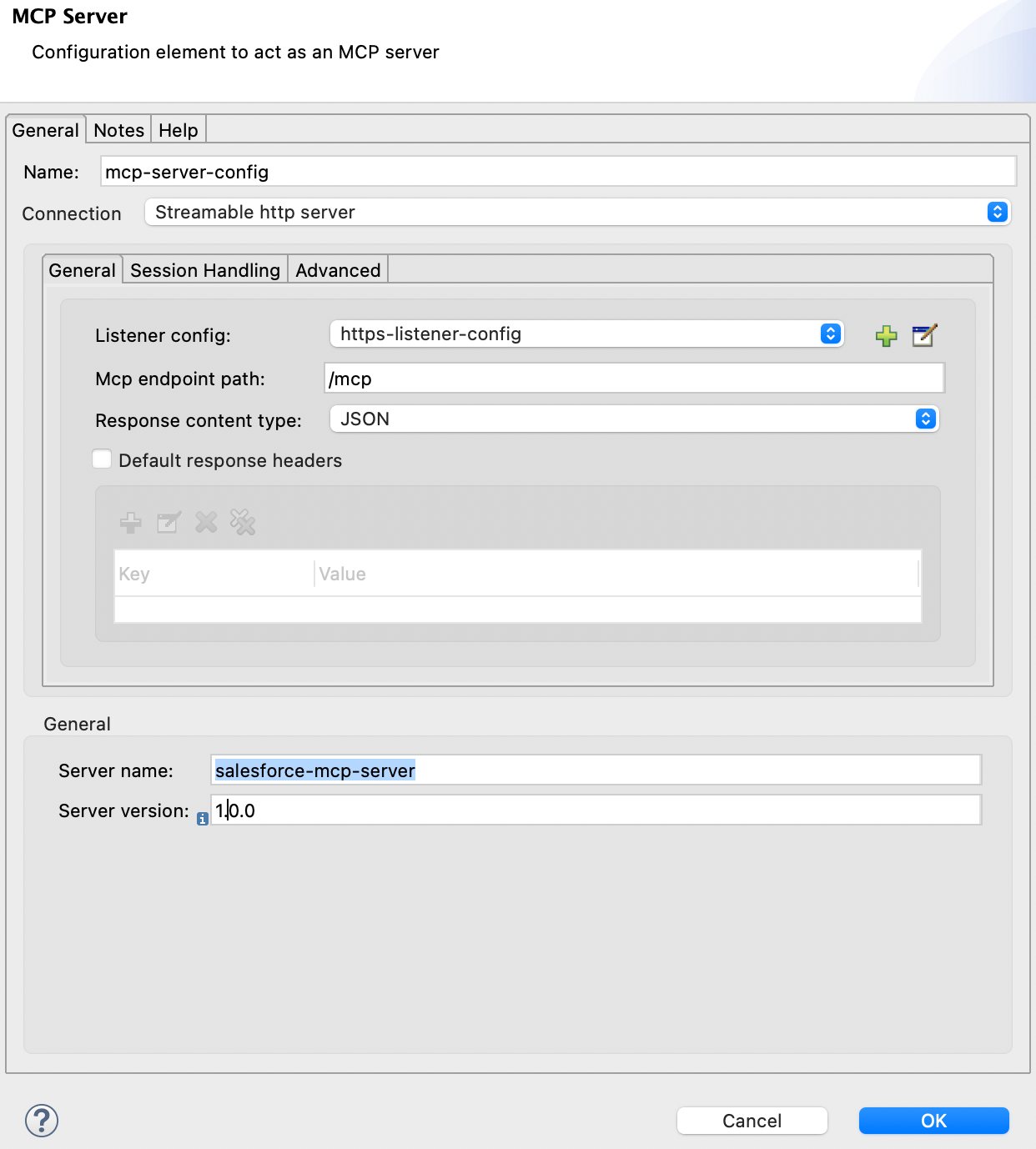
- Create a new MCP configuration. This example uses a Streamable HTTP server as the transport, which is the recommended choice for MCP applications. The MCP configuration requires an HTTP listener because the streamable HTTP MCP server communicates over HTTP. Provide a path for the MCP server and name the server, including the server version. The server uses the name and version to identify itself during the protocol initialization phase.
- After the MCP server config is ready, set up the tool. Each tool requires a name and description to identify it and must be attached to an MCP server via the MCP configuration. The tool also needs to expose the input parameters through the input schema. This schema should be as descriptive as possible, as it helps the AI application understand each parameter's context and determine which parameters to use.
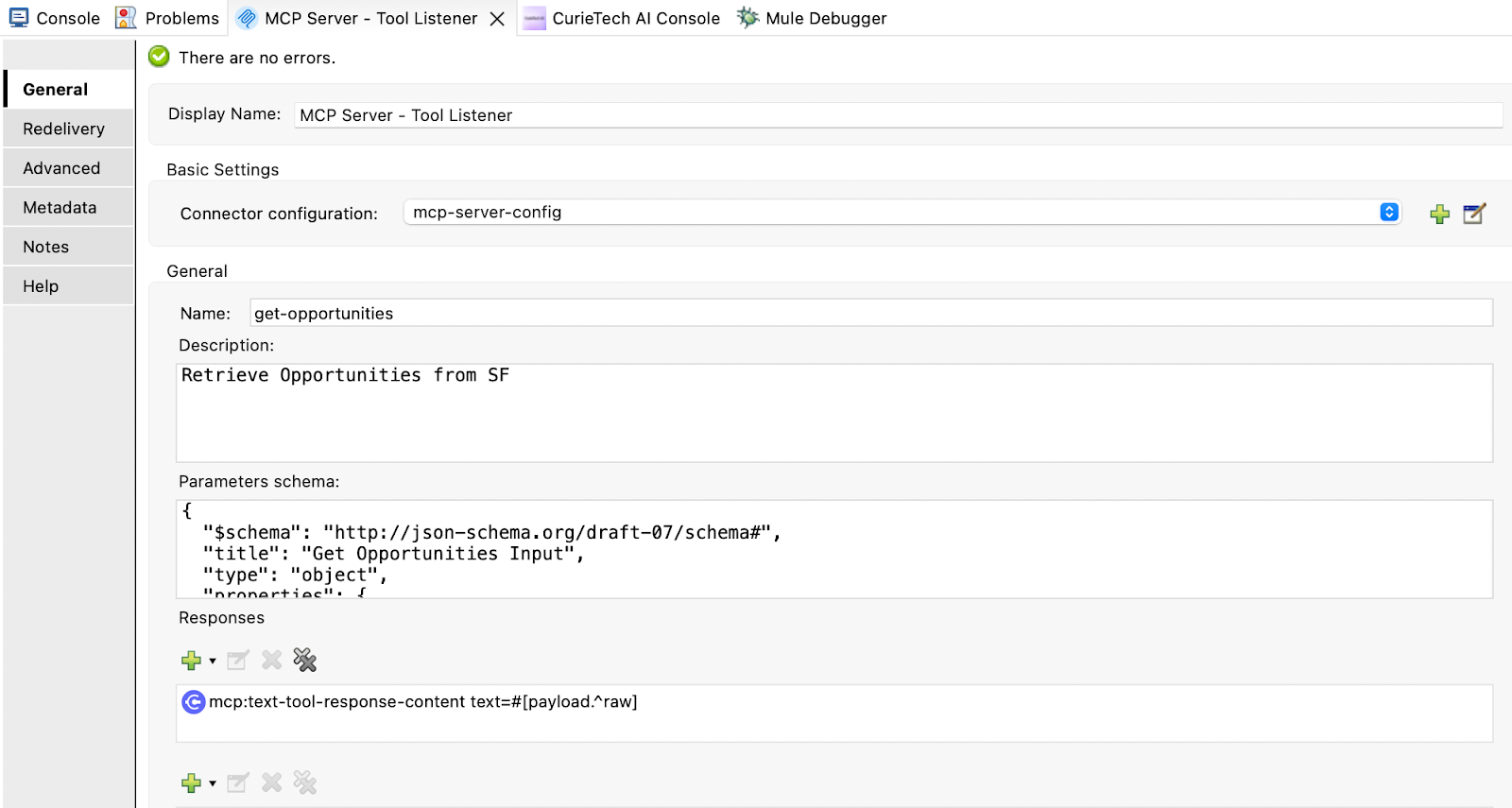
{
  "$schema": "http://json-schema.org/draft-07/schema#",
  "title": "Get Opportunities Input",
  "type": "object",
  "properties": {
    "stage": {
      "type": "string",
      "enum": [
        "Prospecting",
        "Qualification",
        "Needs Analysis",
        "Value Proposition",
        "Id. Decision Makers",
        "Perception Analysis",
        "Proposal/Price Quote",
        "Negotiation/Review",
        "Closed Won",
        "Closed Lost"
      ]
    },
    "ownerId": {
      "type": "string"
    },
    "ownerName": {
      "type": "string",
      "description": "Filter by owner name (supports partial match)."
    },
    "accountId": {
      "type": "string"
    },
    "accountName": {
      "type": "string",
      "description": "Filter by account name (supports partial match)."
    },
    "minAmount": {
      "type": "number"
    },
    "maxAmount": {
      "type": "number"
    },
    "fromCreatedDate": {
      "type": "string",
      "format": "date-time"
    },
    "toCreatedDate": {
      "type": "string",
      "format": "date-time"
    }
  },
  "required": [],
  "additionalProperties": false
}
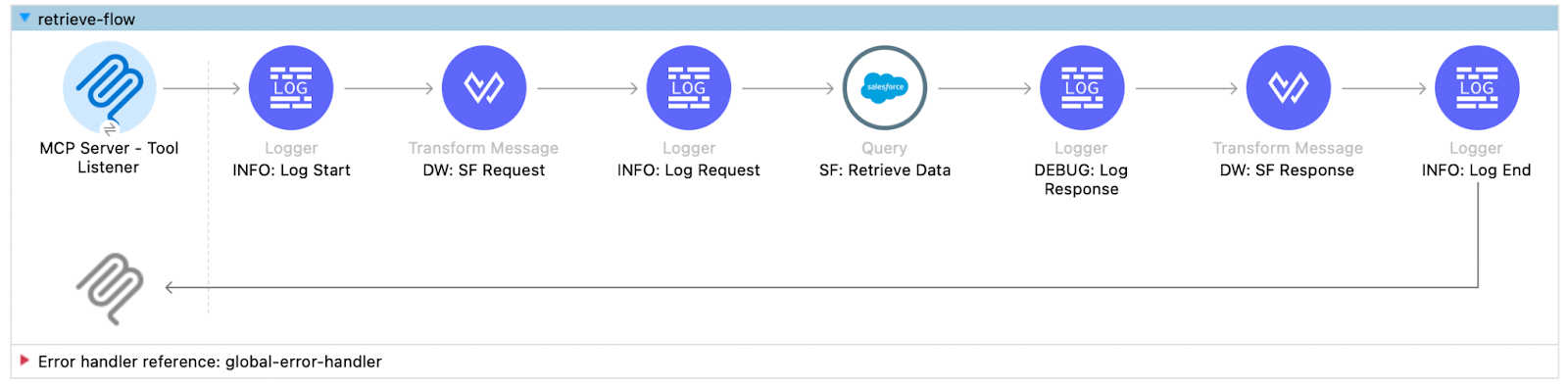
- After setting up the MCP server listener tool, implement the business process to retrieve opportunities from Salesforce. The application uses simple logic to interpret the AI agent's request and transform it into an SF query, including only the filters specified in the request. Here is the transform message used to form the SF query.
%dw 2.0
fun buildWhereClause(data: Object) = ((data filterObject (!isEmpty($)) mapObject ((value, key, index) -> {
	filter: (key match {
		case stage if stage as String == "stage" -> "stageName = '$value'"
	    case ownerId if ownerId as String == "ownerId" -> "OwnerId = '$value'"
	    case ownerName if ownerName as String == "ownerName" -> "Owner.Name LIKE '%$value%'"
	    case accountId if accountId as String == "accountId" -> "accountId = '$value'"
	    case accountName if accountName as String == "accountName" -> "Account.Name LIKE '%$value%'"
	    case minAmount if minAmount as String == "minAmount" -> "amount >= $value"
	    case maxAmount if maxAmount as String == "maxAmount" -> "amount <= $value"
	    case fromCreatedDate if fromCreatedDate as String == "fromCreatedDate" -> "createdDate >= $value"
	    case toCreatedDate if toCreatedDate as String == "toCreatedDate" -> "createdDate <= $value"
	    case stage if stage as String == "stage" -> "stageName = '$value'"
	    case stage if stage as String == "stage" -> "stageName = '$value'"
	    else -> ""
	})
})).*filter joinBy " AND ")
output application/java
---
(do {
	var whereClause = buildWhereClause(payload)
	---
	{
		query: "SELECT Id, Name, StageName, Probability, Amount, CloseDate, CreatedDate, LastModifiedDate, Account.Id, Account.Name, Owner.Id, Owner.Name, LastActivityDate FROM Opportunity" ++ if ( !isEmpty(whereClause) ) " WHERE " ++ whereClause else "",
		params: {}
	}
})
The flow logic adheres to standard MuleSoft practices for retrieving data from Salesforce and returning a response. The MCP connector, as the source, enables the application's capability to interact with AI agents.
Deploying and testing the MCP server application
MCP server applications can be deployed to MuleSoft runtimes in a similar way to other MuleSoft applications. You can simply build the application and deploy it to the specified runtime.
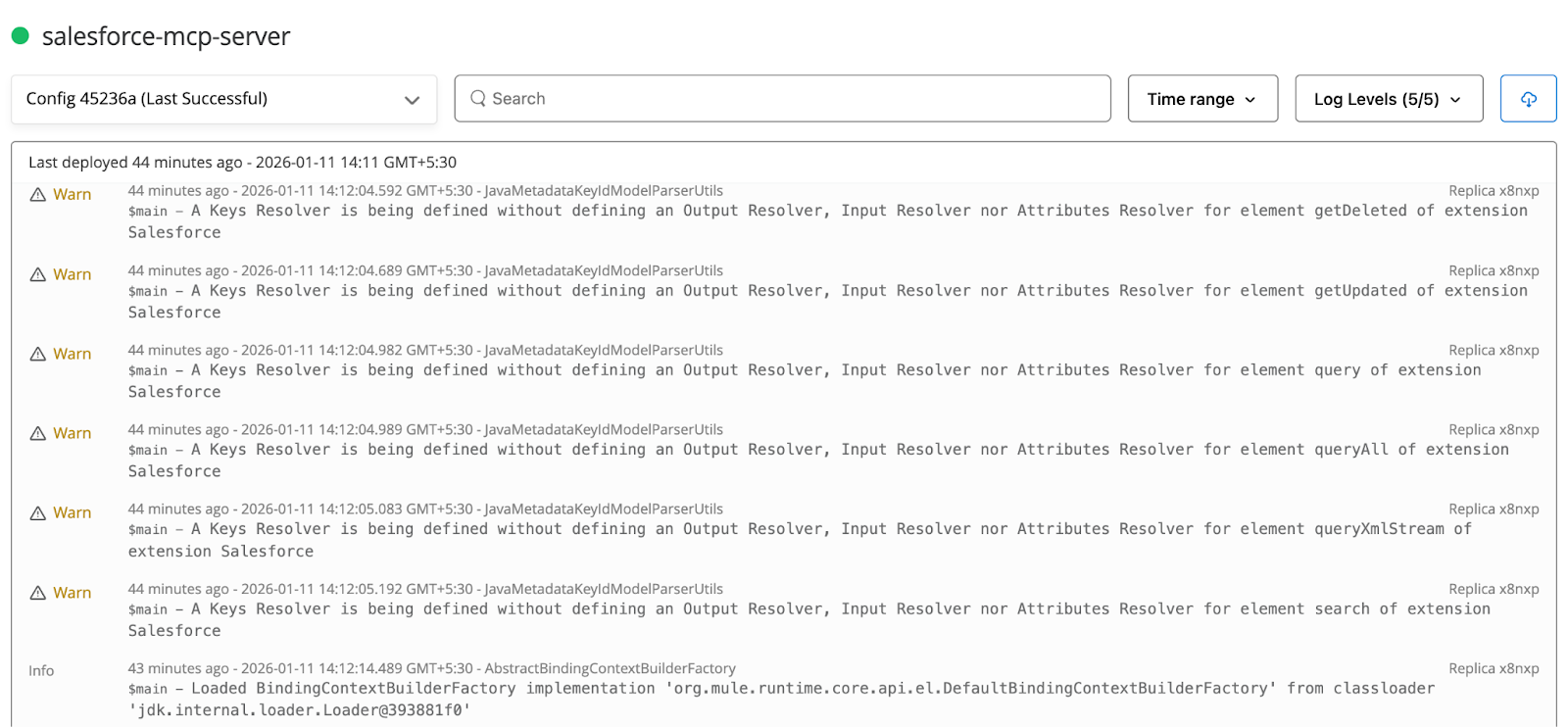
After the MuleSoft application is deployed to the runtime, it’s time to test it. You can use the MCP inspector to connect to the MCP server and test it before connecting the server to an AI agent. The inspector is an interactive tool for testing and debugging MCP servers. It can run directly with npx without any additional installations; just ensure Node is installed on your machine.
Follow these steps:
- To run the MCP inspector, run the following command using the command line. This opens the MCP inspector in the browser, where you can connect to the deployed MCP server and test its capabilities:
px @modelcontextprotocol/inspector
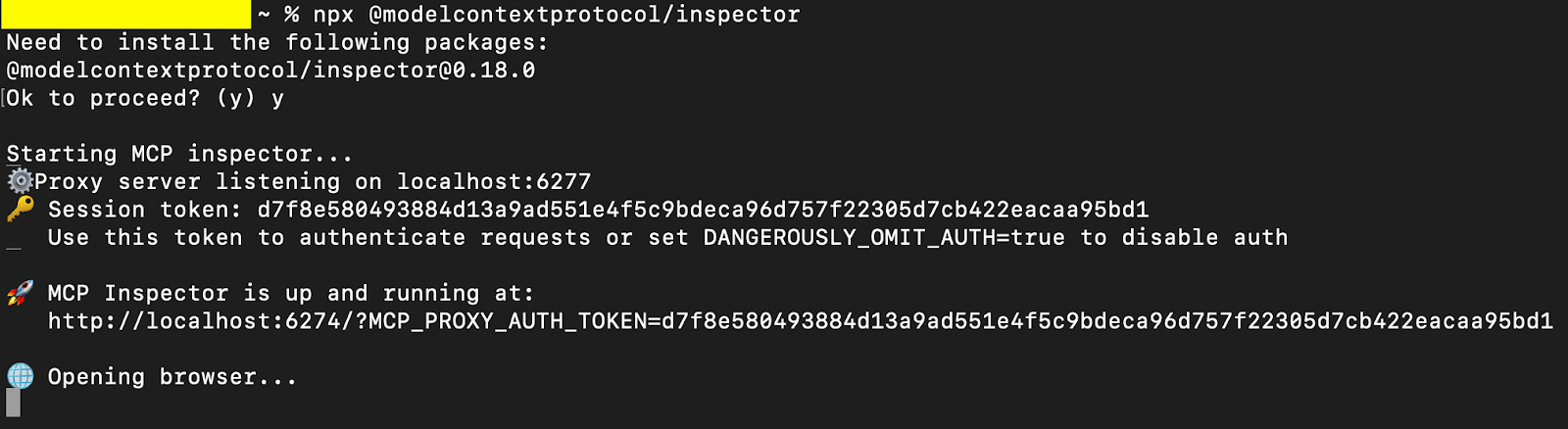
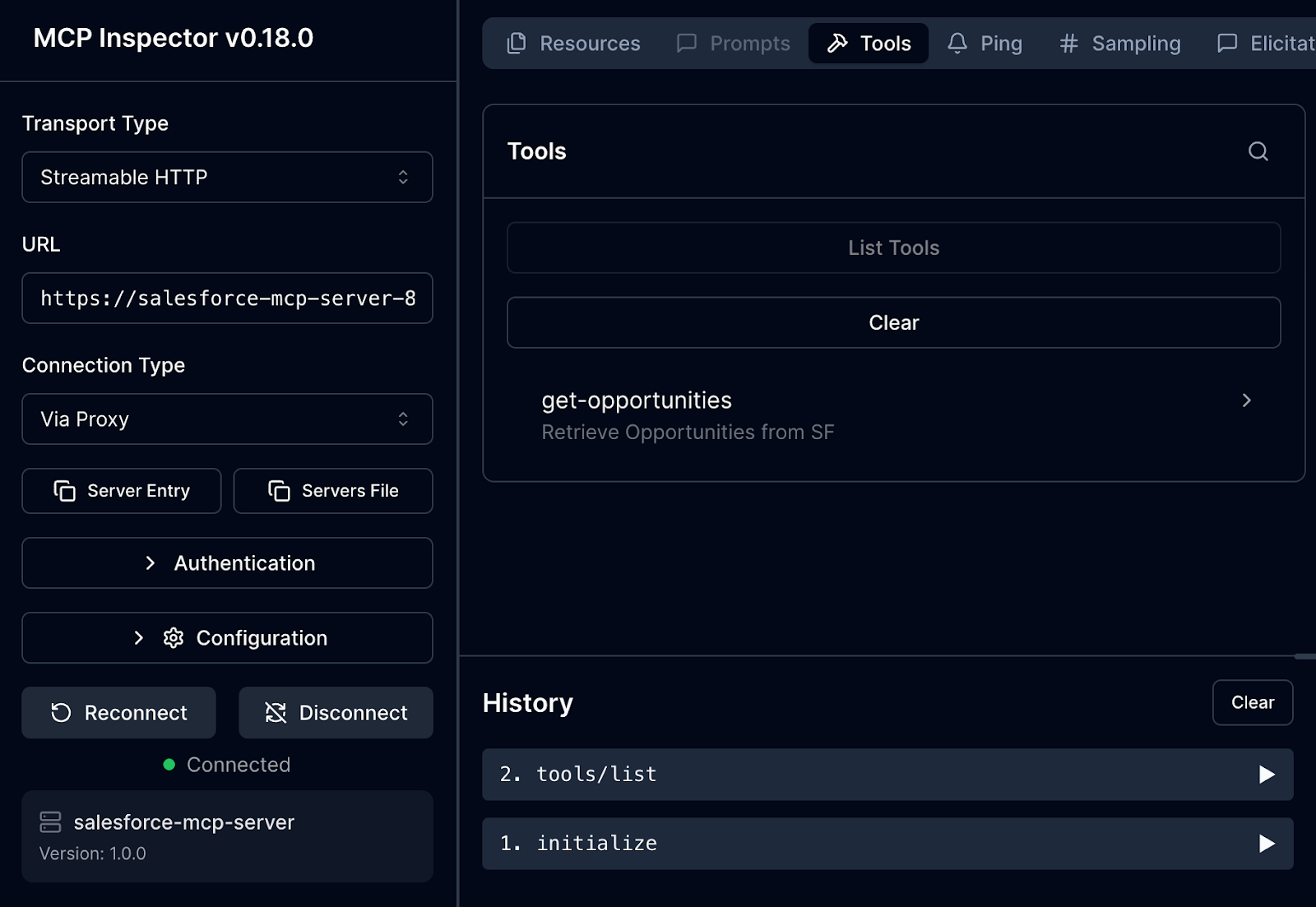
- Provide the MCP server URL and the transport type, then click the Connect button to establish a connection to the MCP server. Once connected, you can use the Tools tab to list all the tools exposed by the connected server.
In the snapshot below, you can see that the MCP inspector first initiates a session with the MCP server using the initialize command, then requests the list of tools using the tools/list command. The get-opportunities tool exposed by the MuleSoft MCP server gets discovered after the list tool command completes.
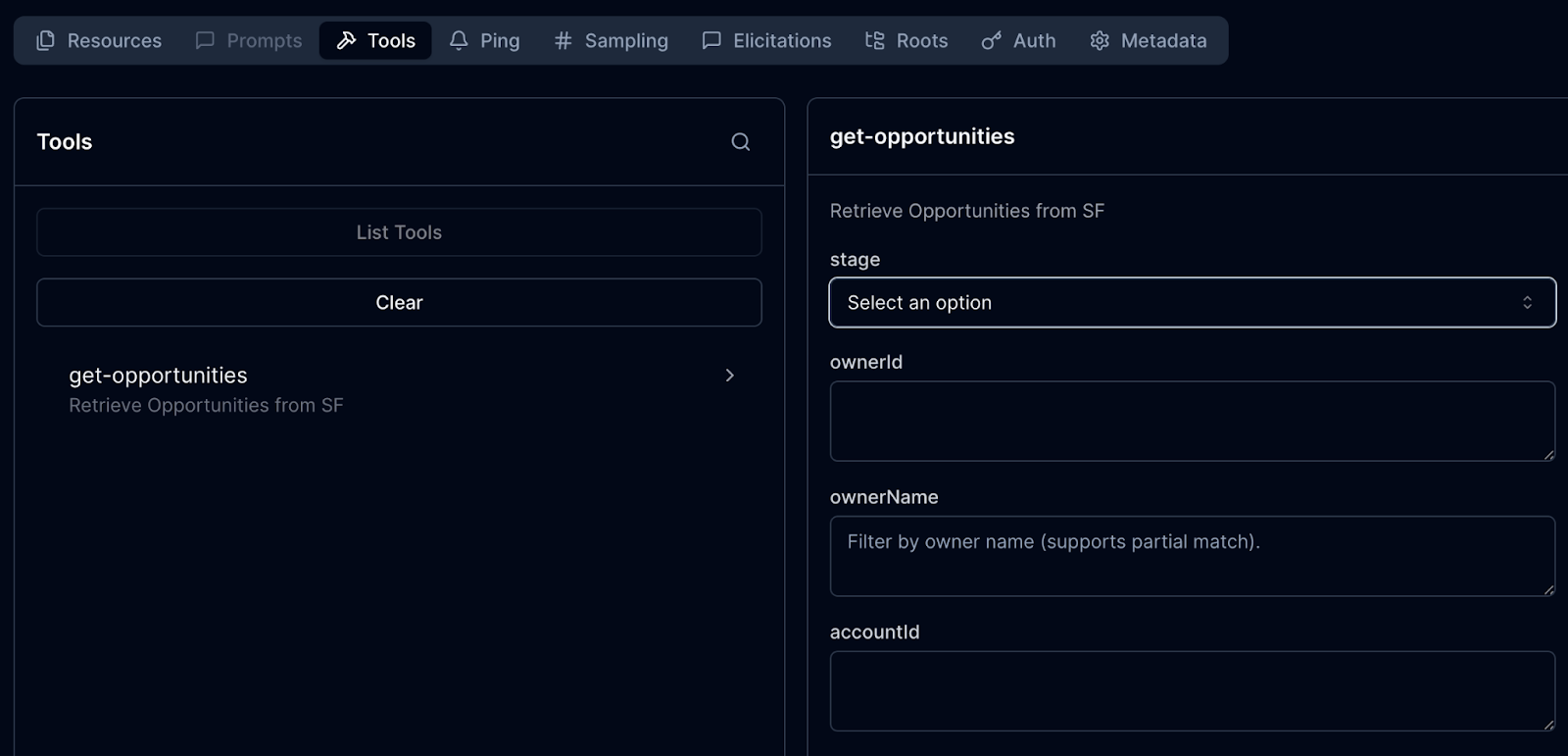
- To test the Retrieve Opportunities tool, click on it and view all the input fields listed, which can be used to filter opportunities in Salesforce.
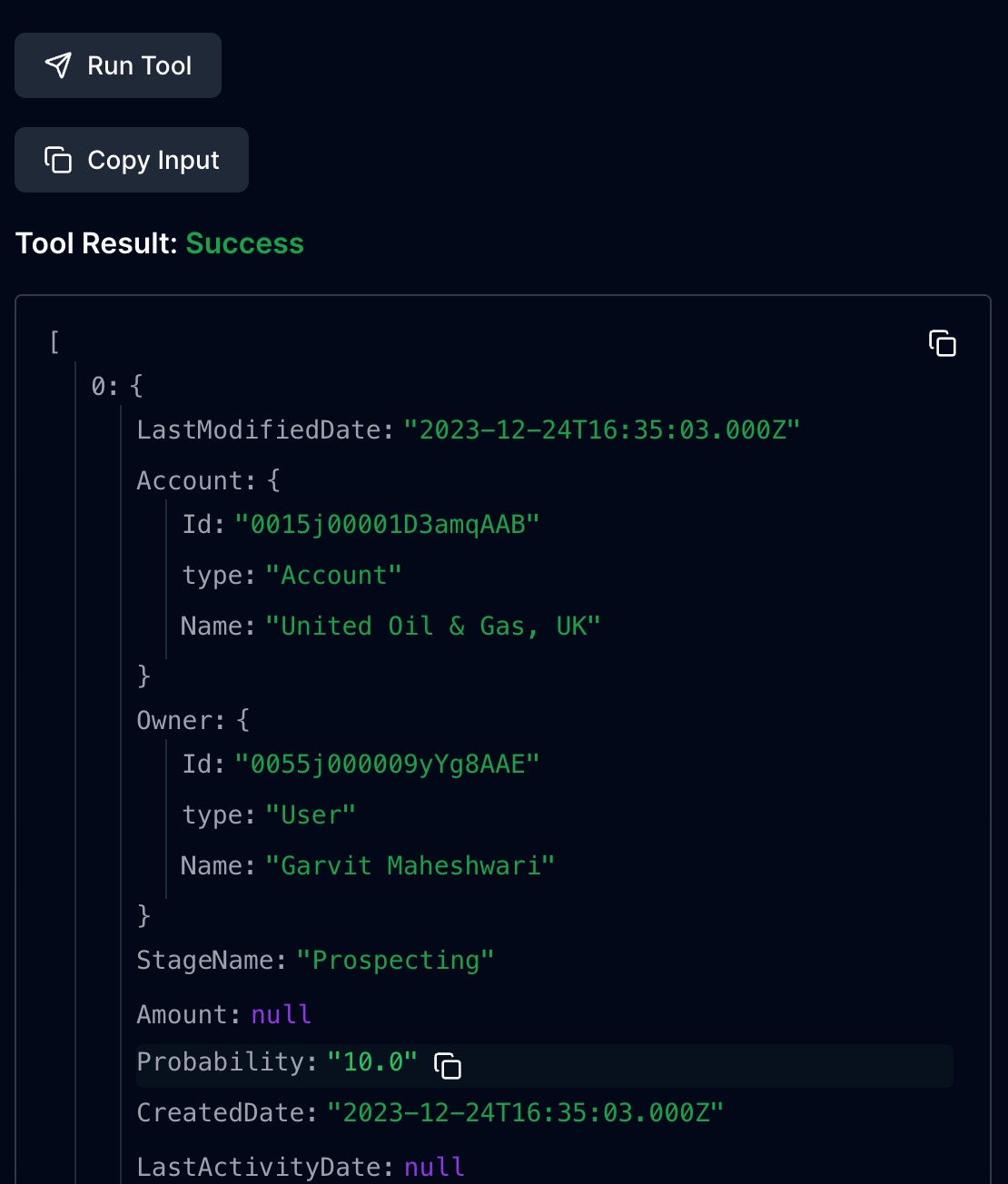
- Run the tool with any filters applied, and you should see the response from the MCP server. At this point, the MCP server can service requests to retrieve opportunities from Salesforce based on specified filters.
Connecting the MCP server to an AI Agent
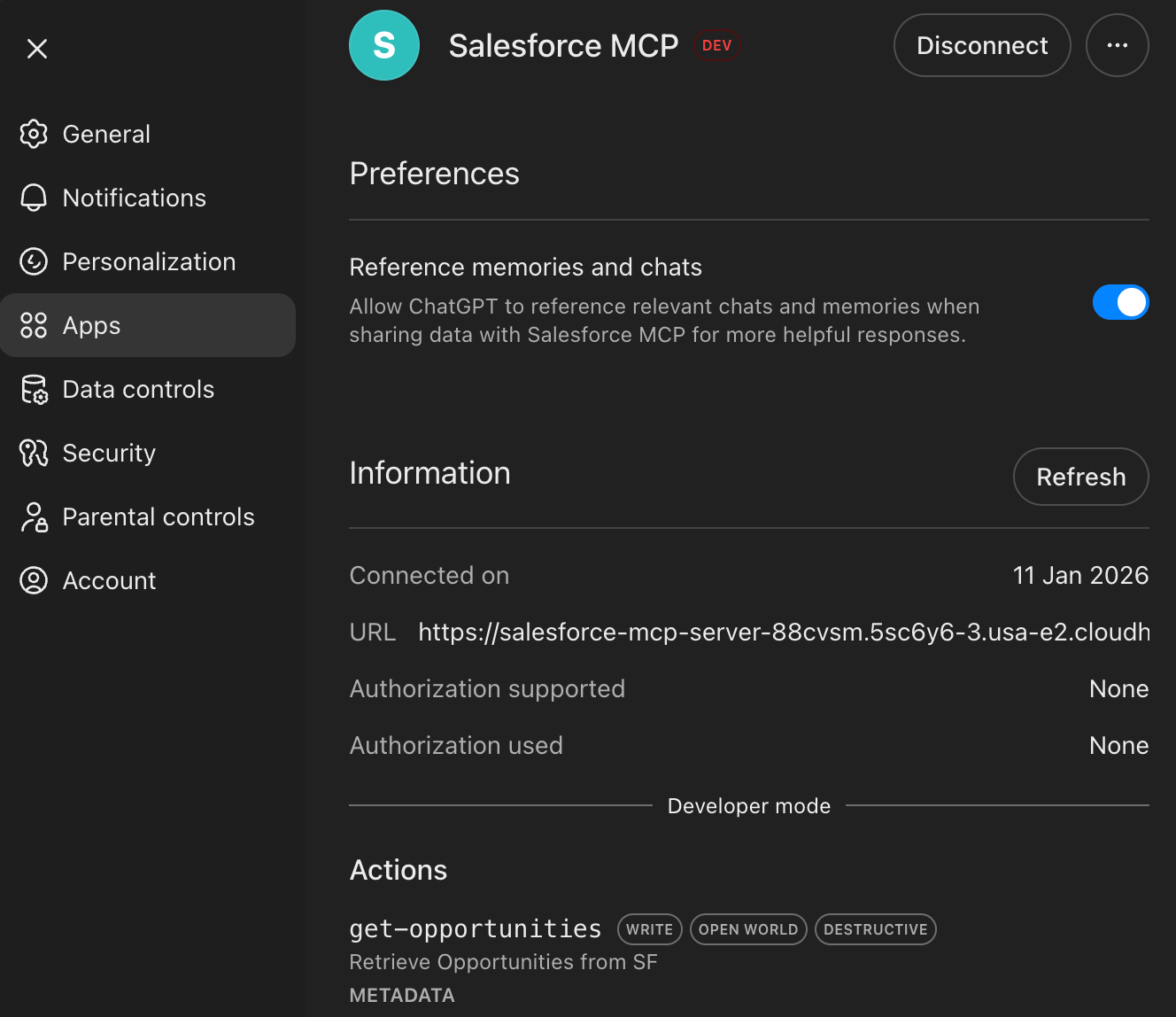
The MCP server is now ready to connect to an AI agent, adding an intelligent layer that enables communication with the end system via natural-language prompts. This example uses ChatGPT as the AI Agent to connect to the MCP server and reason over the prompts. You can use ChatGPT apps to connect to custom MCP servers by specifying the server URL and authentication properties.
Note: It is highly recommended to enable authentication on the MCP server to secure the server and protect information from public access.
Once the MCP details are provided and the server is connected with ChatGPT, you can use the MCP server to service requests.
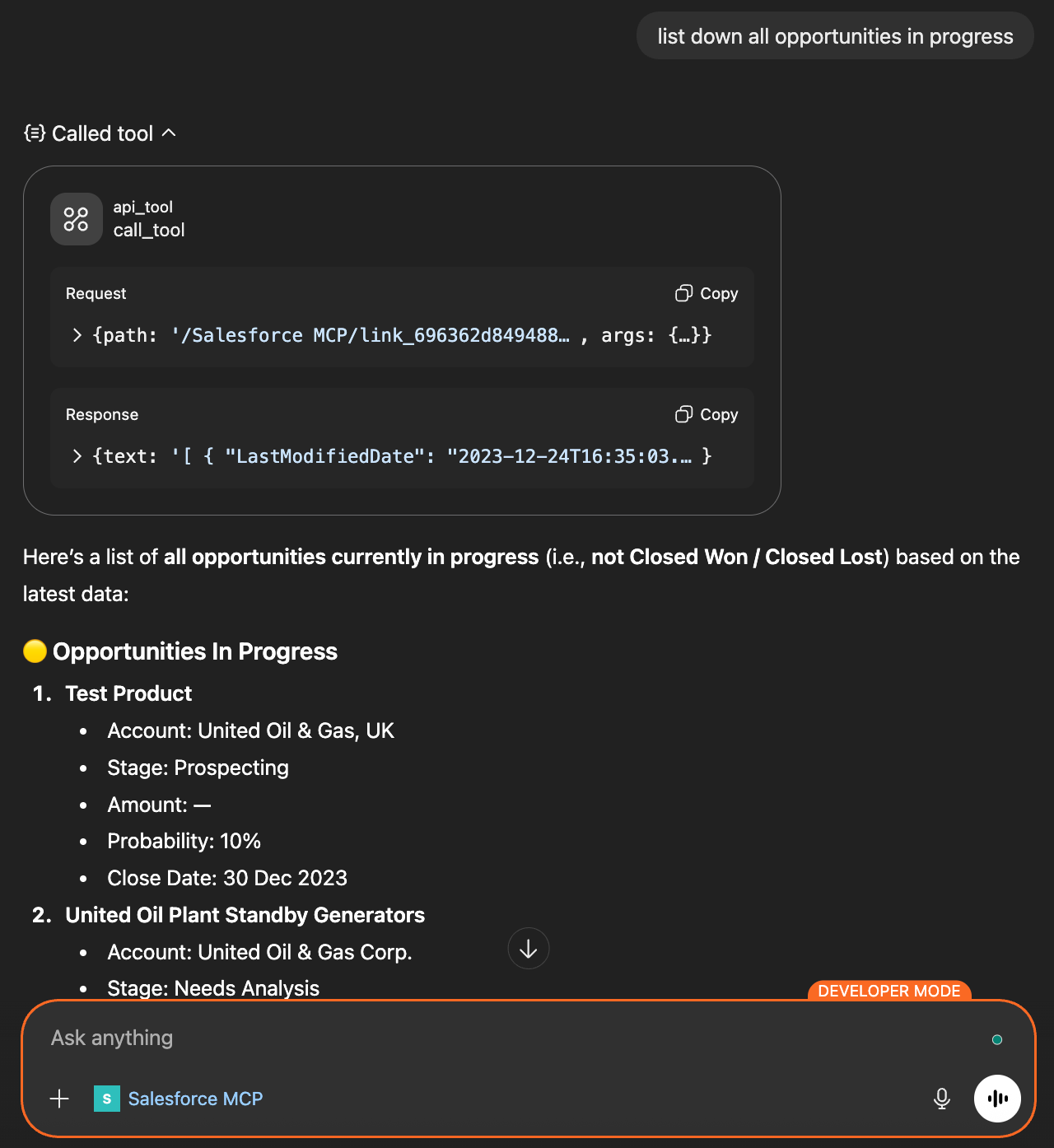
Here is a snapshot of the conversation in which the agent is asked to list all in-progress opportunities. The AI agent recognizes the prompt's context and invokes the appropriate tool on the MCP server to fulfill the user's request. It determines which input parameters to pass to the tool and how to display the response.
Using the CurieTech AI Agent Repository Coder to create an MCP server
CurieTech AI is a specialized AI platform built and optimized for MuleSoft, offering AI agents that help you code, test, and document entire workflows. CurieTech offers specialized AI tools to help you create simple and complex integrations with ease, using straightforward prompts.
You can use the CurieTech AI Agent Repository Coder to further develop the application by adding new tools, thereby accelerating development, reducing effort and time, and maintaining code standards and efficiency.
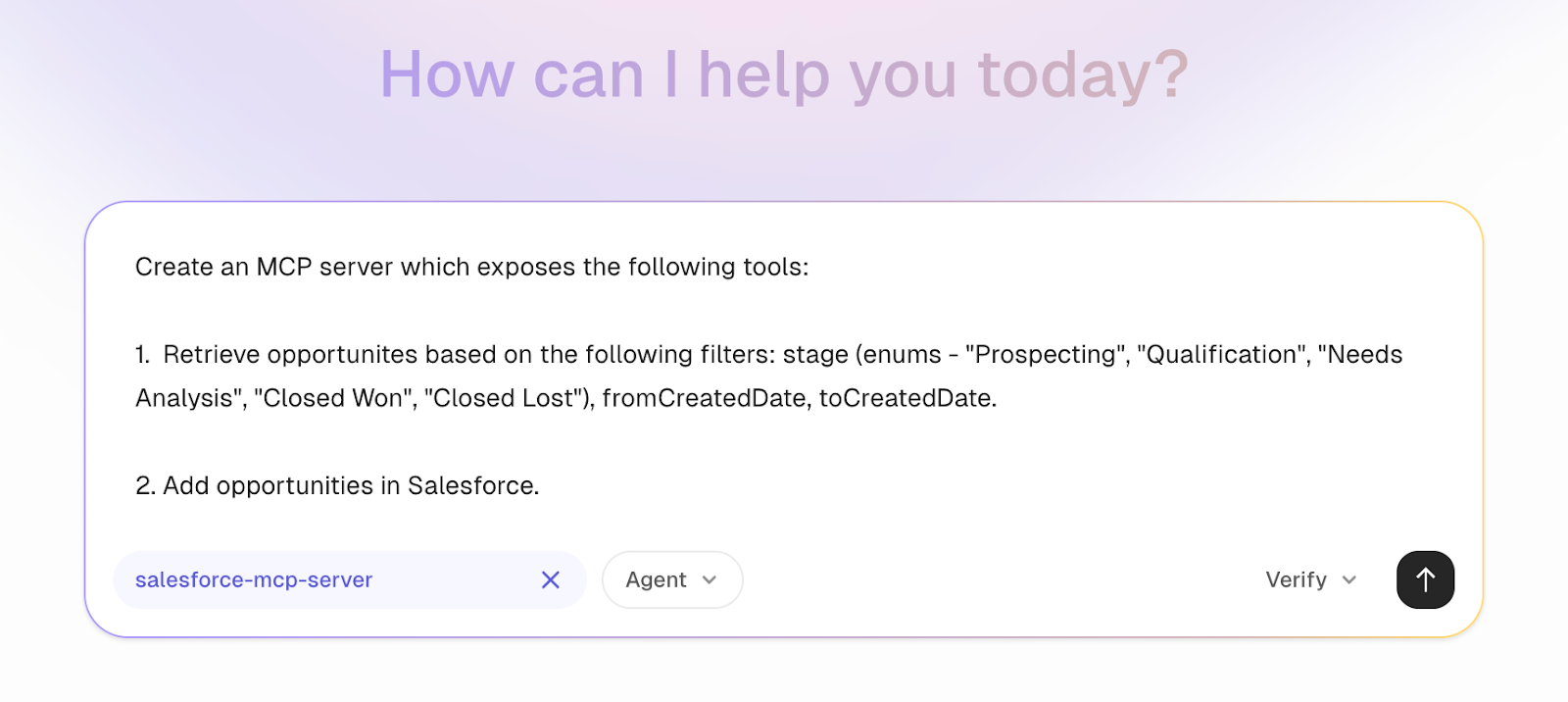
Let’s build an application that not only exposes a tool to retrieve opportunities but also allows us to add new opportunities using the AI Agent.
Here is the prompt for the Repository Coder, which explains the required tools for the project and provides an overview of the fields to generate the MCP server from scratch.
CurieTech AI can even ask follow-up questions to ensure that it has all the information before starting to build the project. Once the agent has all the necessary information, it provides a plan summary and creates a new task for developing the MuleSoft project.
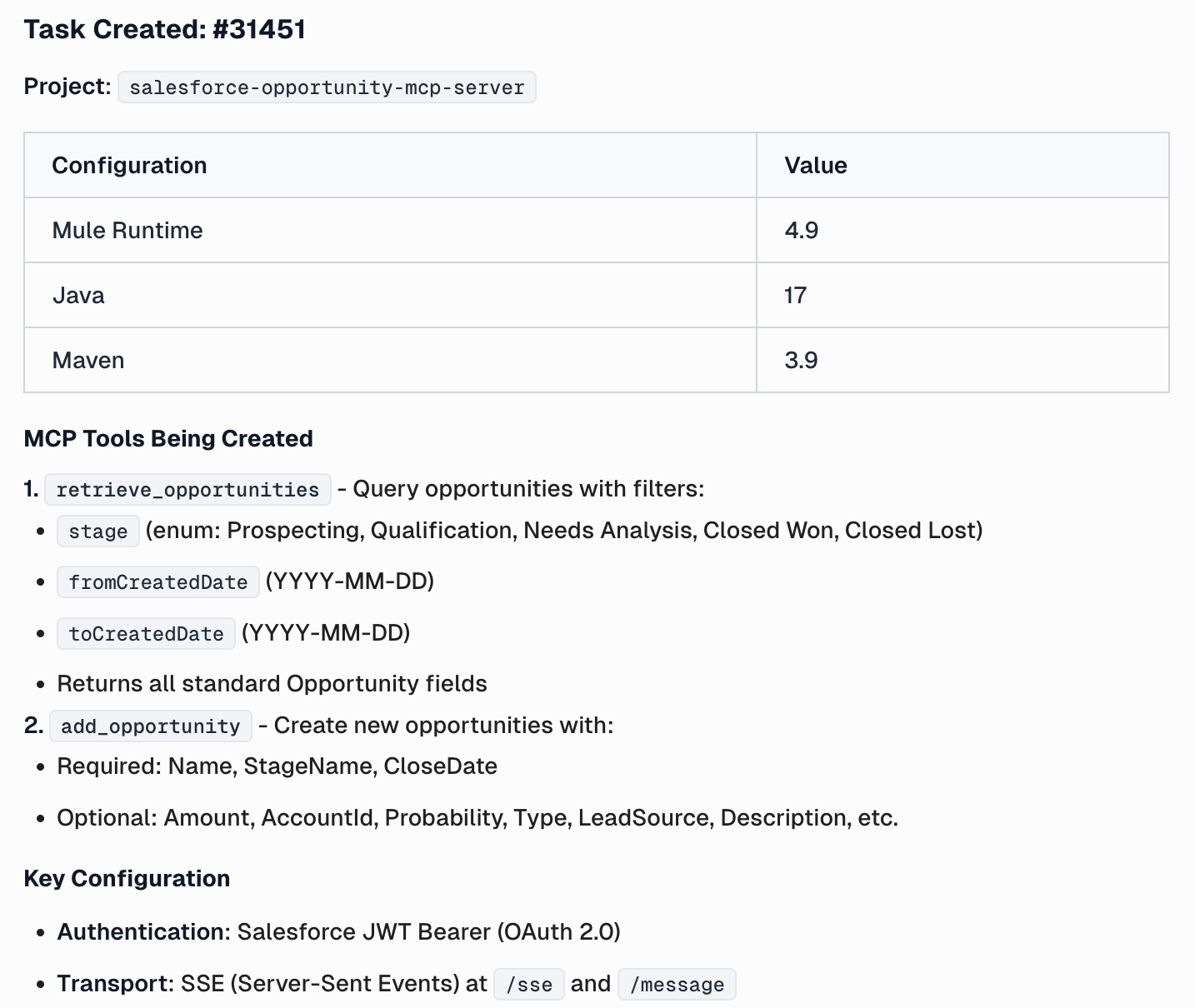
The CurieTech agent generates the complete project, including an overview of how the application is implemented and how everything works. It also provides the project's configuration parameters and the VM arguments required to run it.
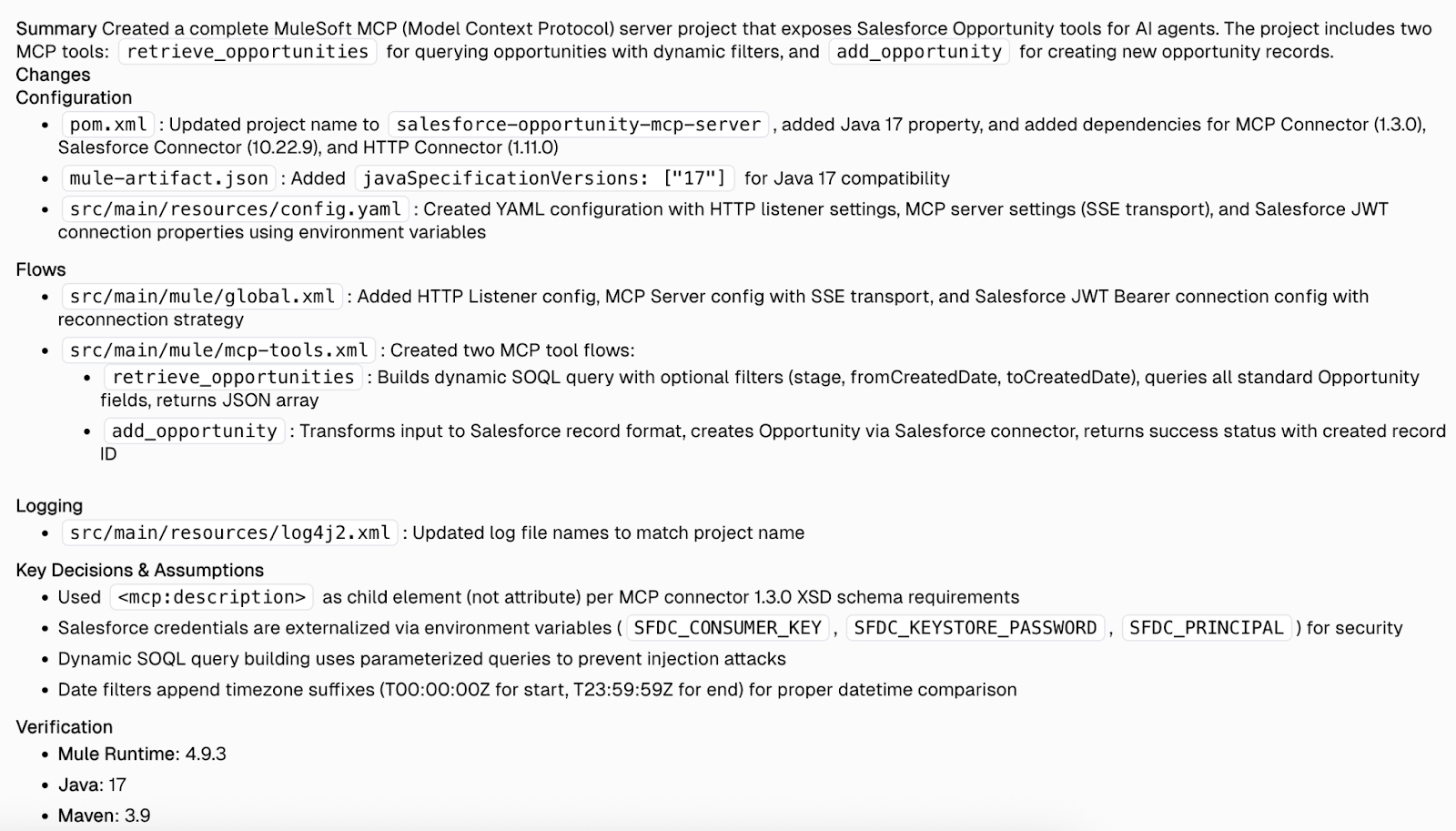
Here are the flows generated by the CurieTech agent:
- Retrieve Opportunities Tool: Retrieves opportunities from Salesforce using the specified filters.
- Add Opportunity Tool: Allows you to add opportunities to Salesforce.
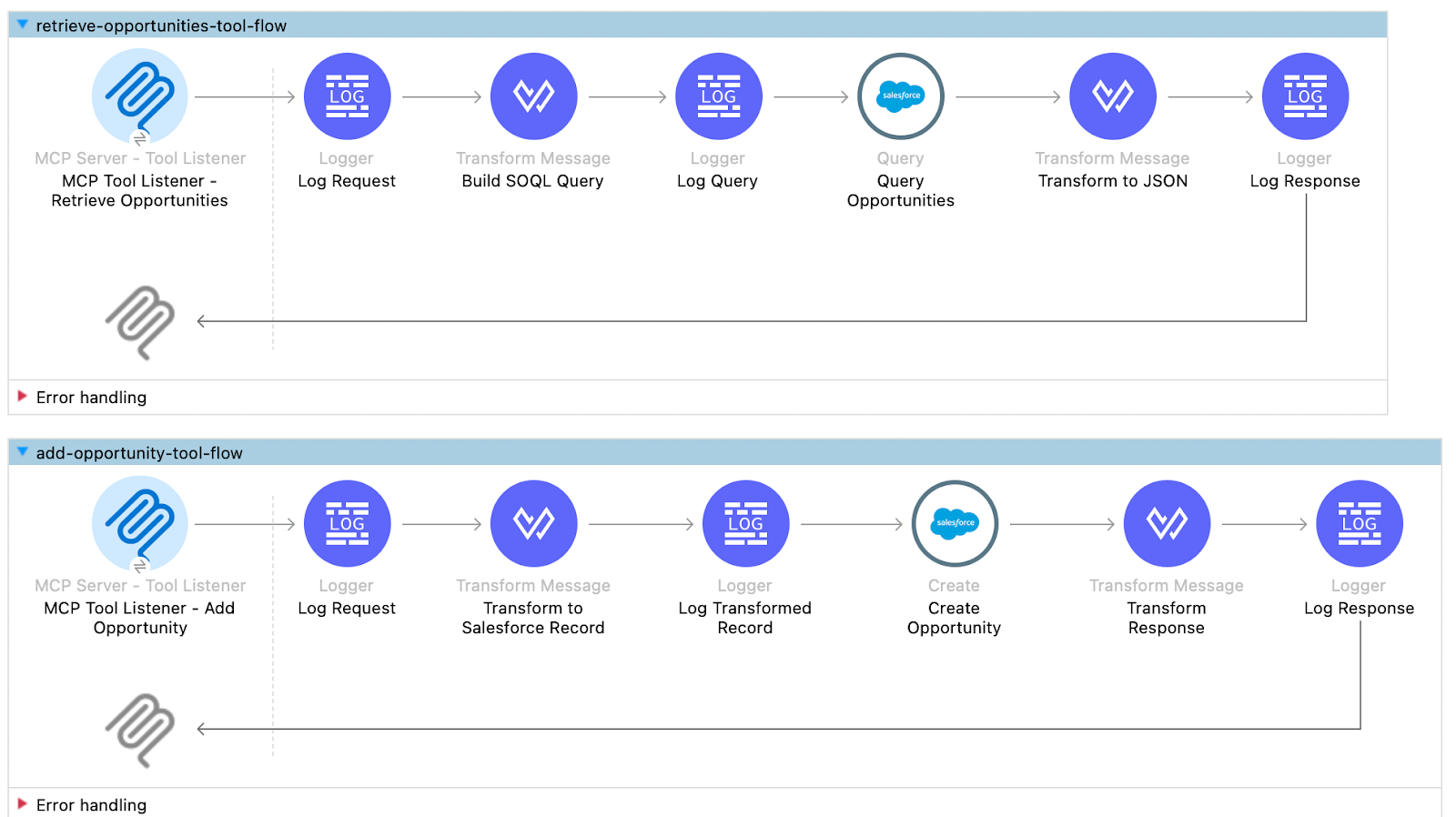
The CurieTech AI Agent Repository Coder simplifies the creation and extension of MCP servers by turning clear intent into working, standards-compliant code. By using targeted prompts, teams can rapidly add new tools, evolve integrations, and maintain consistency across the application. This approach not only accelerates development but also enables teams to focus more on business logic and outcomes rather than repetitive implementation details.
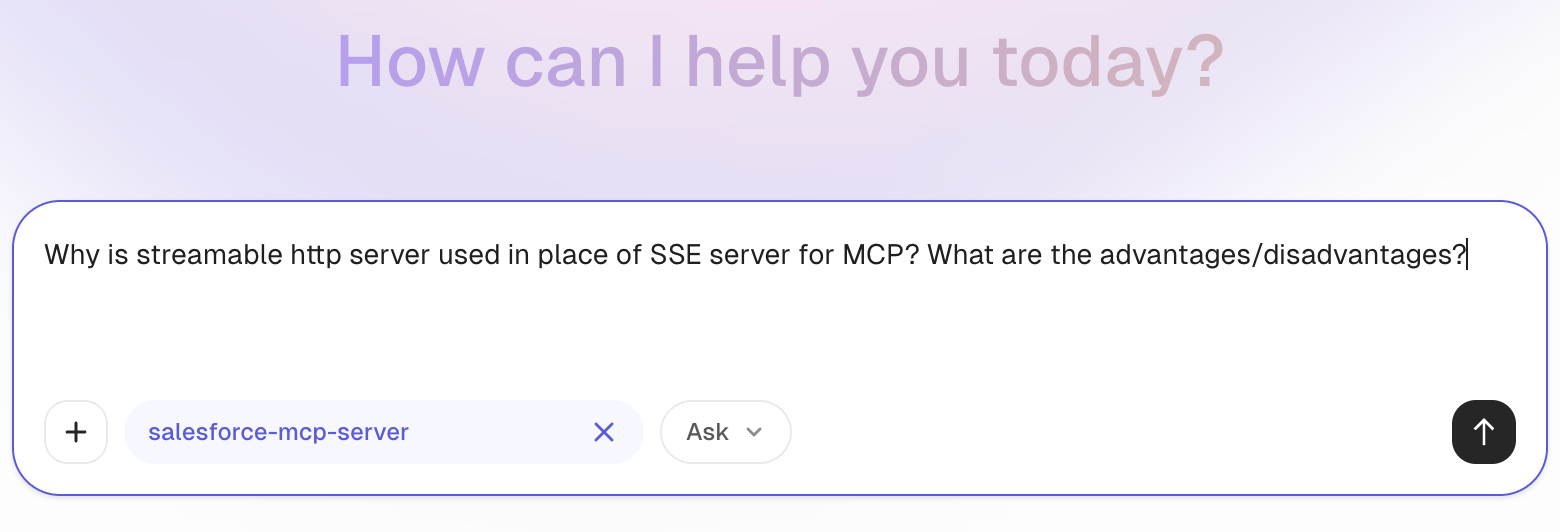
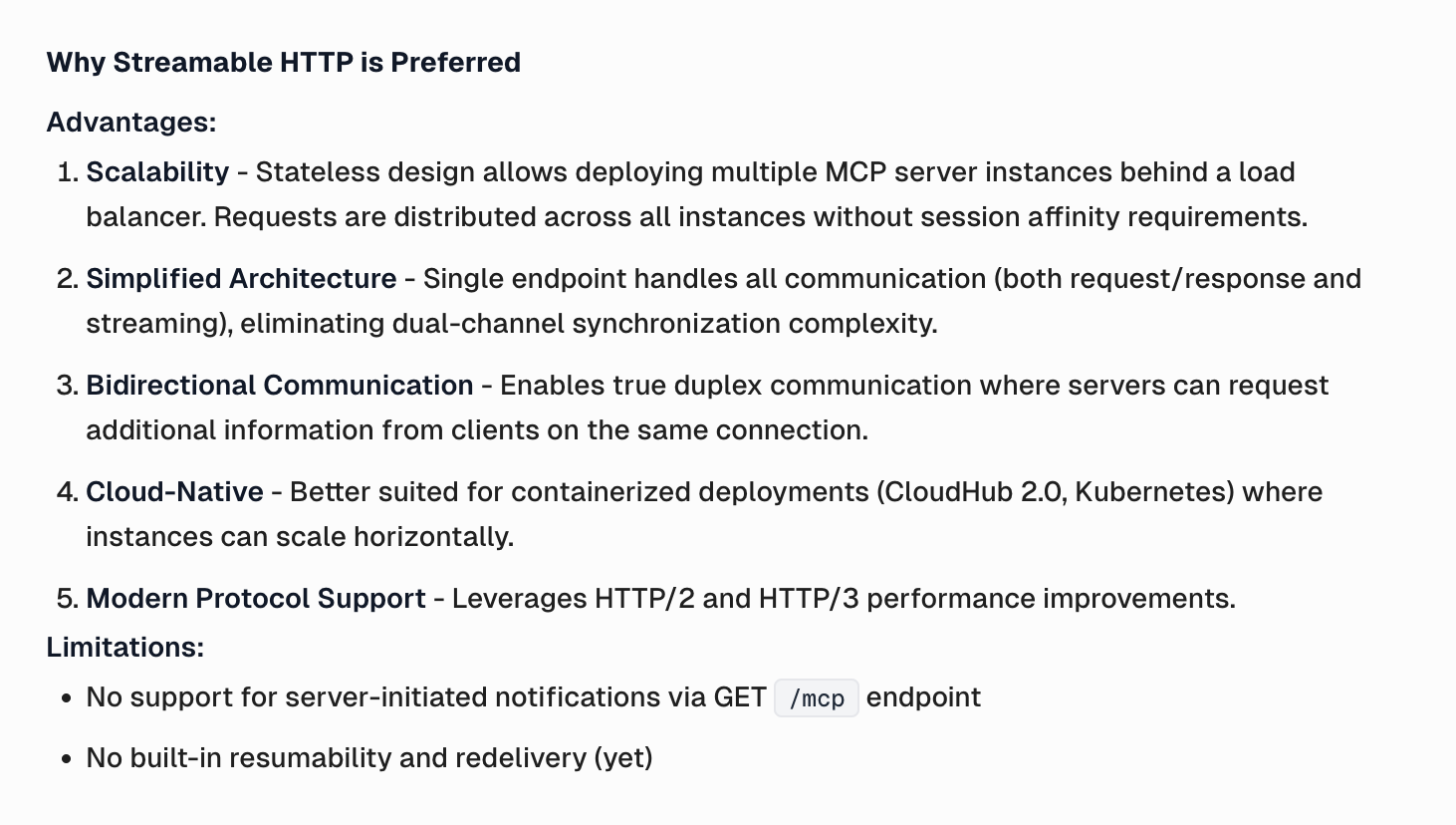
You can further utilize Curie’s ability to ask any questions you might have regarding the generated code. Let’s go through an example to clarify why the agent chose the Streamable HTTP server versus the SSE server for the MCP connection in the application.
The agent provides an answer, explaining that the Streamable HTTP transport is used because it offers a stateless design and a simplified architecture, supports modern protocols such as HTTP/2 and HTTP/3, and enables performance improvements.
The agent also provides an overview that SSE is deprecated because it incurs connection overhead from persistent connections that consume resources even when idle, lacks connection recovery, and requires a separate channel for client-to-server messages.
Making the MCP server secure
Securing the MCP server involves applying strong authentication and authorization to control who can access tools and resources. All communication should be encrypted, and access must be limited to only approved capabilities through strict policy enforcement.
To address security, the MuleSoft MCP connector integrates with various security components in the MuleSoft ecosystem. The MuleSoft MCP connector provides an On New Session Listener component that listens for requests when a new MCP client tries to connect to the MCP server. This processor can be used to add and implement any security practices for the MCP server.
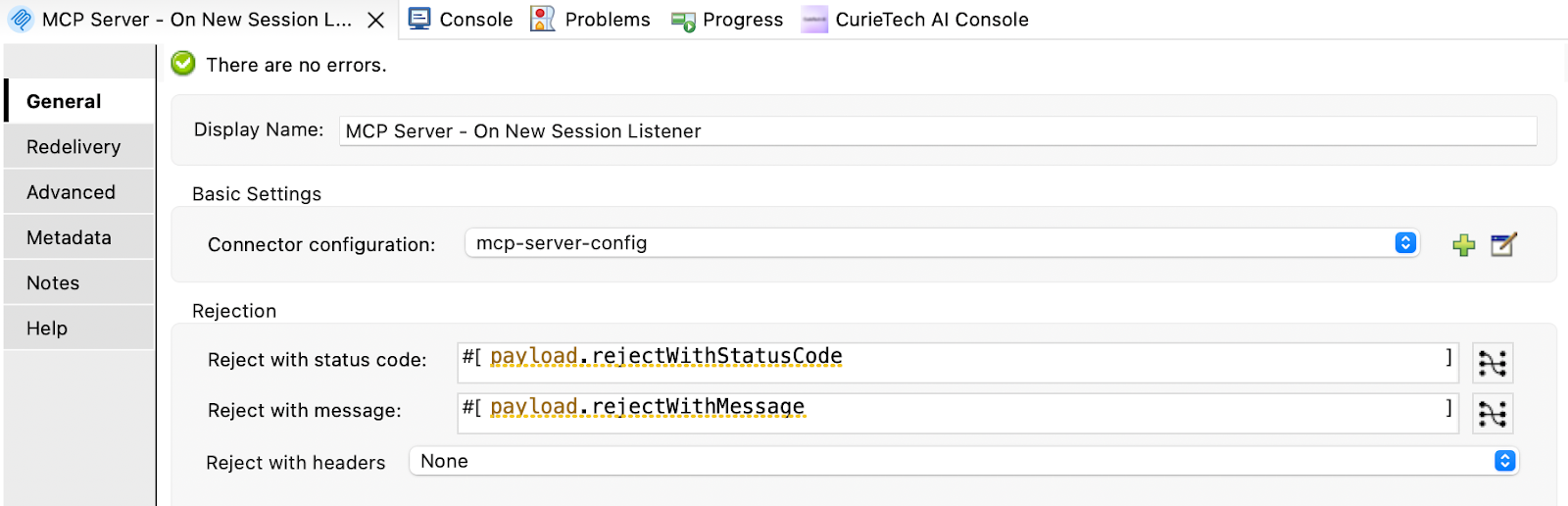
A session is rejected when the rejectWithStatusCode parameter resolves to a non-null value. The session is also rejected if the flow fails for any other reason (e.g., returning a 500 response code).
You can create a new flow and add the MCP connector’s On New Session Listener component. The payload exposes an auto-generated session ID (sessionId) parameter and an additional properties object (additionalProperties), which contains the authorization header. This authorization header can be used to validate the request. The implementation of how the validation is performed can be handled in the flow logic. Here is the payload snapshot from the new session listener.
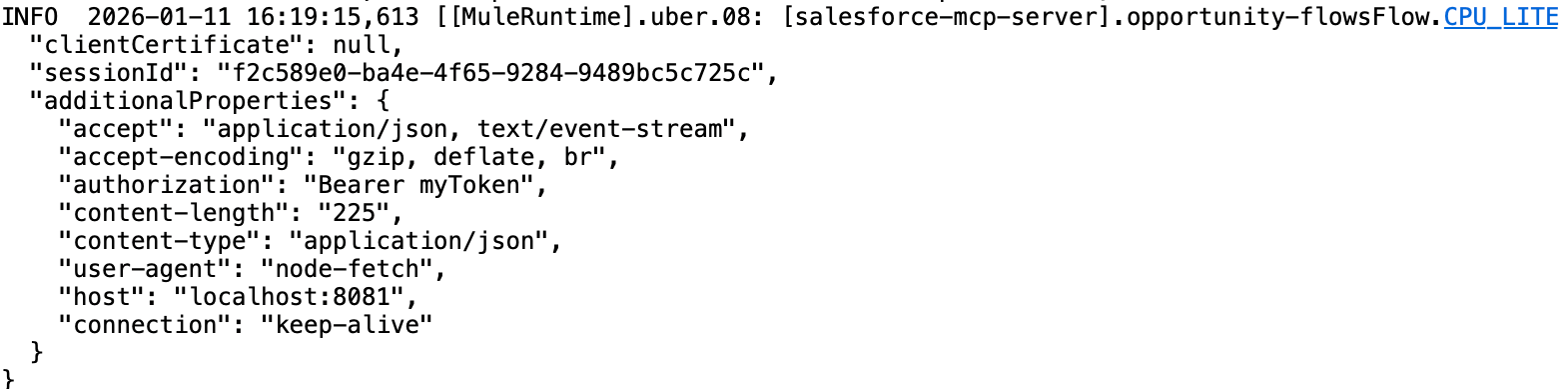
You can either validate the request manually or call an external system, such as OKTA, which validates the token, or even use MuleSoft’s OAuth provider for your own OAuth provider.
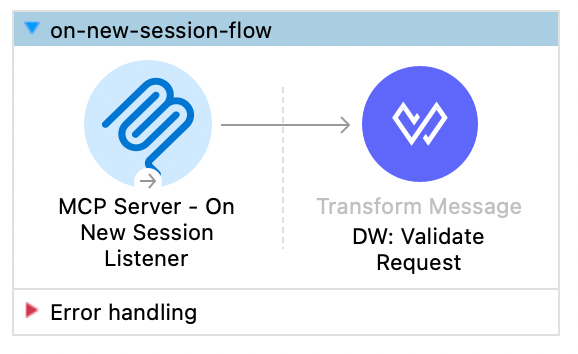
Here is a simple flow for manual validation of the authorization header.
To verify the new session flow, let's add a token to the MCP inspector's request.
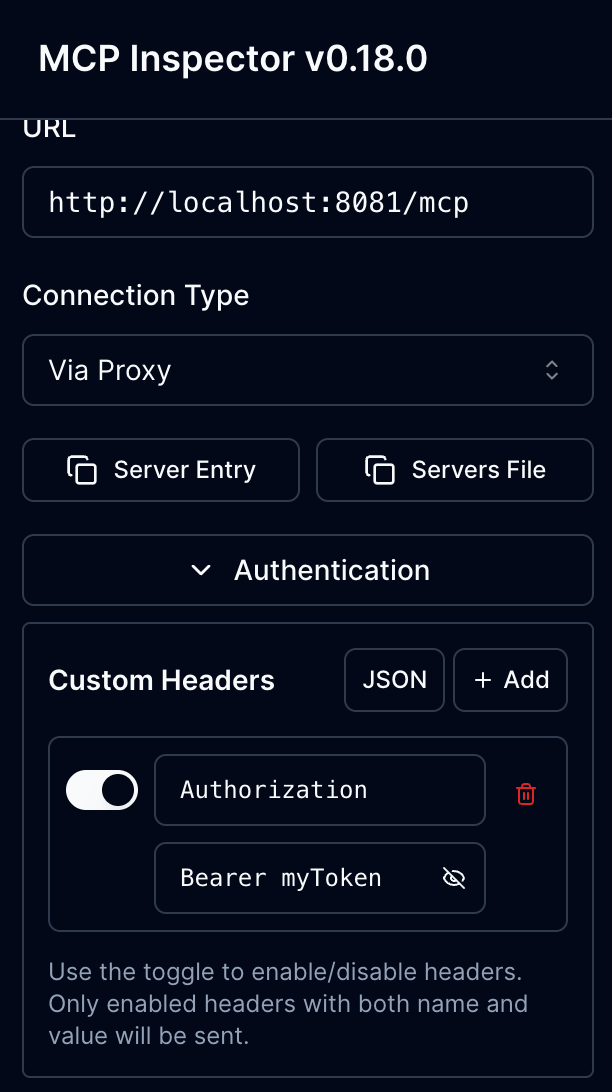
The On New session listener flow is triggered, and the request token is validated in the DWL. A successful response is returned to the MCP client, establishing a successful connection.
Here are the logs from the new session listener flow.

Best practices
The flexibility required for AI applications and the robust controls needed for enterprise systems must be carefully balanced when designing MCP servers. MCP servers can be kept safe, dependable, and maintainable at scale by following these best practices:
- Secure MCP server access: Access to an MCP server must be tightly controlled. Strong authentication and authorization mechanisms should be enforced to ensure that only approved MCP clients can connect. Network security, encryption in transit, and policy enforcement help prevent unauthorized access while maintaining trust in AI-driven interactions.
- Properly manage credentials and secrets: MCP servers should never use hardcoded credentials or secrets. They must be accessed only at runtime and stored safely using specialized secret management systems. The risk of credential exposure and misuse is reduced by implementing appropriate rotation, restricting scope, and ensuring least-privilege access.
- Design well-scoped MCP tools: ensure they are narrowly scoped and purpose-driven. Each tool must expose a specific action with clear inputs and outputs, avoiding broad or overly powerful operations. Well-scoped tools reduce risk, simplify governance, and make AI behavior more predictable.
- Ensure consistent error handling: Errors should be handled in a structured and predictable manner. MCP servers must return clear, standardized error responses that provide sufficient context for the AI to respond appropriately without exposing internal system details. Consistent error handling improves reliability and simplifies debugging.
- Monitor and log all MCP interactions: Every MCP interaction should be monitored and logged. Detailed logs and metrics provide visibility into tool usage, performance, and potential failures. This observability is crucial for troubleshooting, auditing AI-driven actions, and ensuring regulatory compliance.
- Document MCP server resources and operations: Clear documentation is crucial for the successful adoption of MCP. Each MCP resource and tool should be thoroughly documented, including its purpose, inputs, outputs, and any relevant constraints. Good documentation helps AI developers understand available capabilities and reduces integration errors.
Using CurieTech AI to document a developed MCP server
With AI agents like CurieTech AI Document Generator, it's extremely easy to generate documentation for flows automatically. This example generates documentation for the MCP tools in a project, ensuring thorough end-to-end documentation and making collaboration easier for teams. It uses a simple prompt to generate the documentation for the uploaded project.
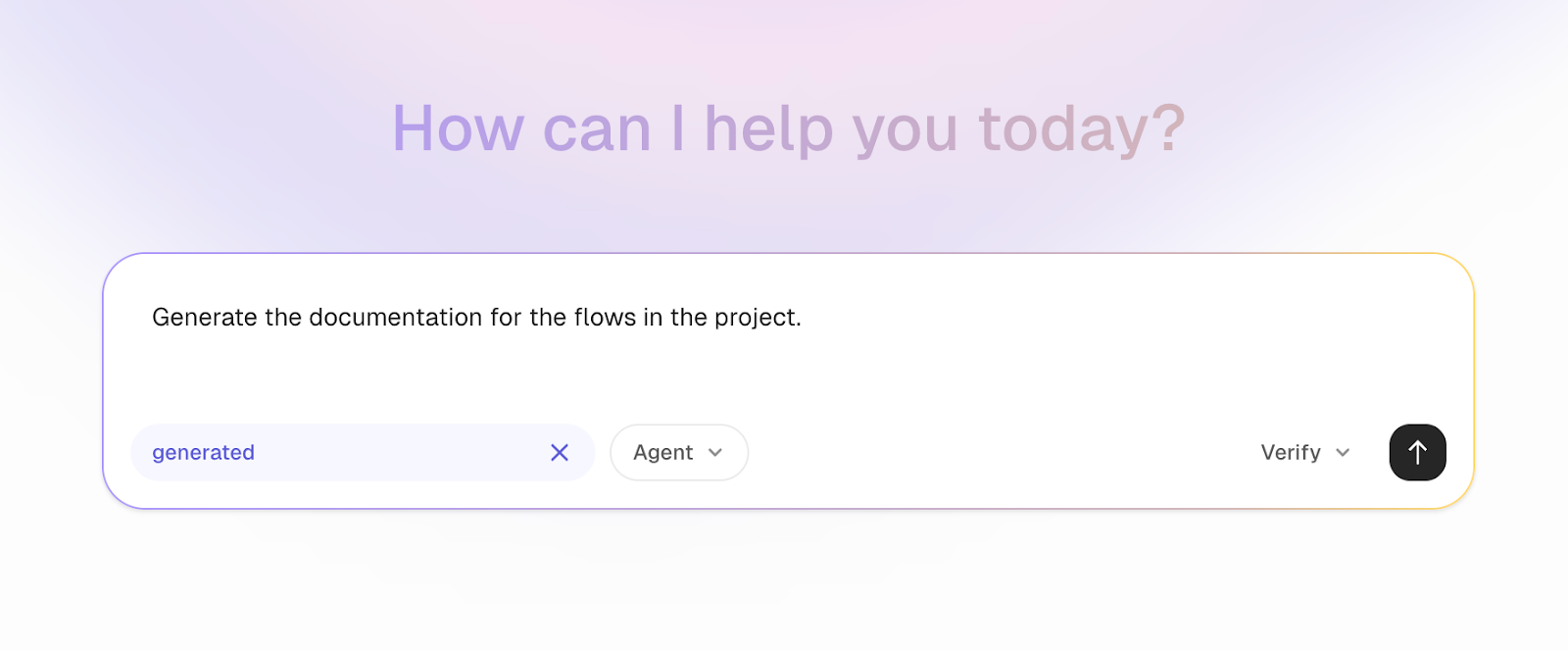
In this example, CurieTech automatically detects the flows and analyzes the process and workflow for both flows in the project. The agent generates a document that captures the entire flow sequence, including authentication, external systems, and process steps. This approach reduces manual effort while promoting consistency, clarity, and traceability across development teams, enabling high-quality documentation to be maintained as delivery timelines are accelerated.
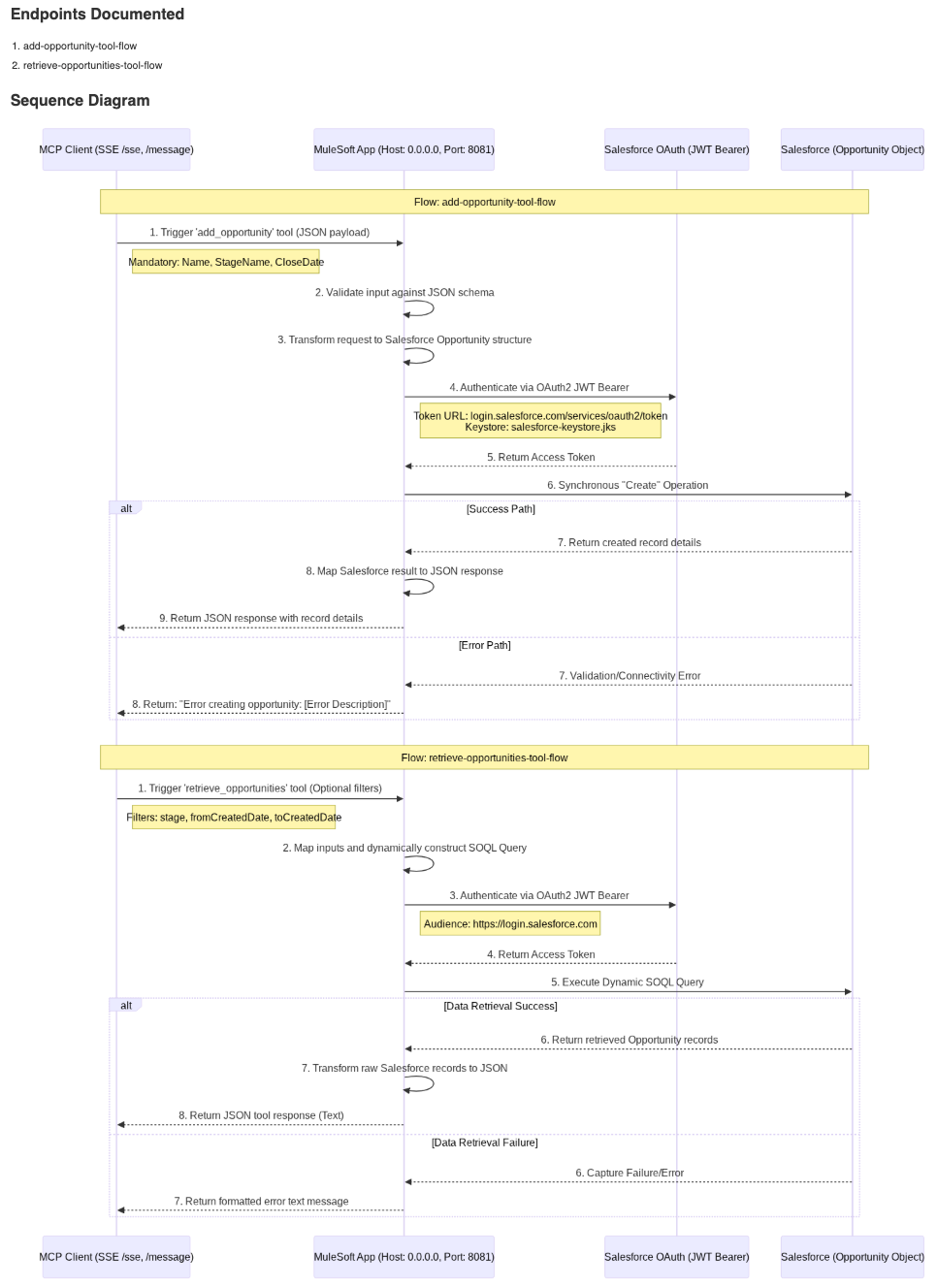
The diagram above, generated by Curie, explains the process sequence for both the retrieve and add opportunity flows. Here is the walkthrough of both the flows:
Add Opportunity Flow: The MCP client triggers the flow by calling the add_opportunity tool. The MuleSoft MCP app receives the request with the input, which is validated against the pre-defined JSON schema. Once validated, the input request is transformed into the input required by Salesforce.
For authenticating requests to Salesforce, the app uses JWT Bearer authentication. The path to acquire a token from Salesforce is also shown in the diagram. The Salesforce connector retrieves the token in the background, so no explicit steps are required to obtain the Salesforce access token.
If the opportunity creation request is executed successfully, the response is passed back to the client in JSON format. If the request fails due to an error, the response is formatted as an error and returned to the MCP client.
Retrieve Opportunity Flow: The MCP client triggers the flow by calling the retrieve_opportunity tool. After the tool is triggered, the input parameters for filtering the opportunity from the request are mapped to construct the SOQL query dynamically. The process then executes the Query operation in Salesforce using the generated SOQL query as input.
After Salesforce successfully returns the opportunity records that match the filter criteria, the response is formatted as JSON and returned to the consumer. If any failure occurs during execution of the Salesforce request, the error is captured, formatted, and returned to the MCP client.
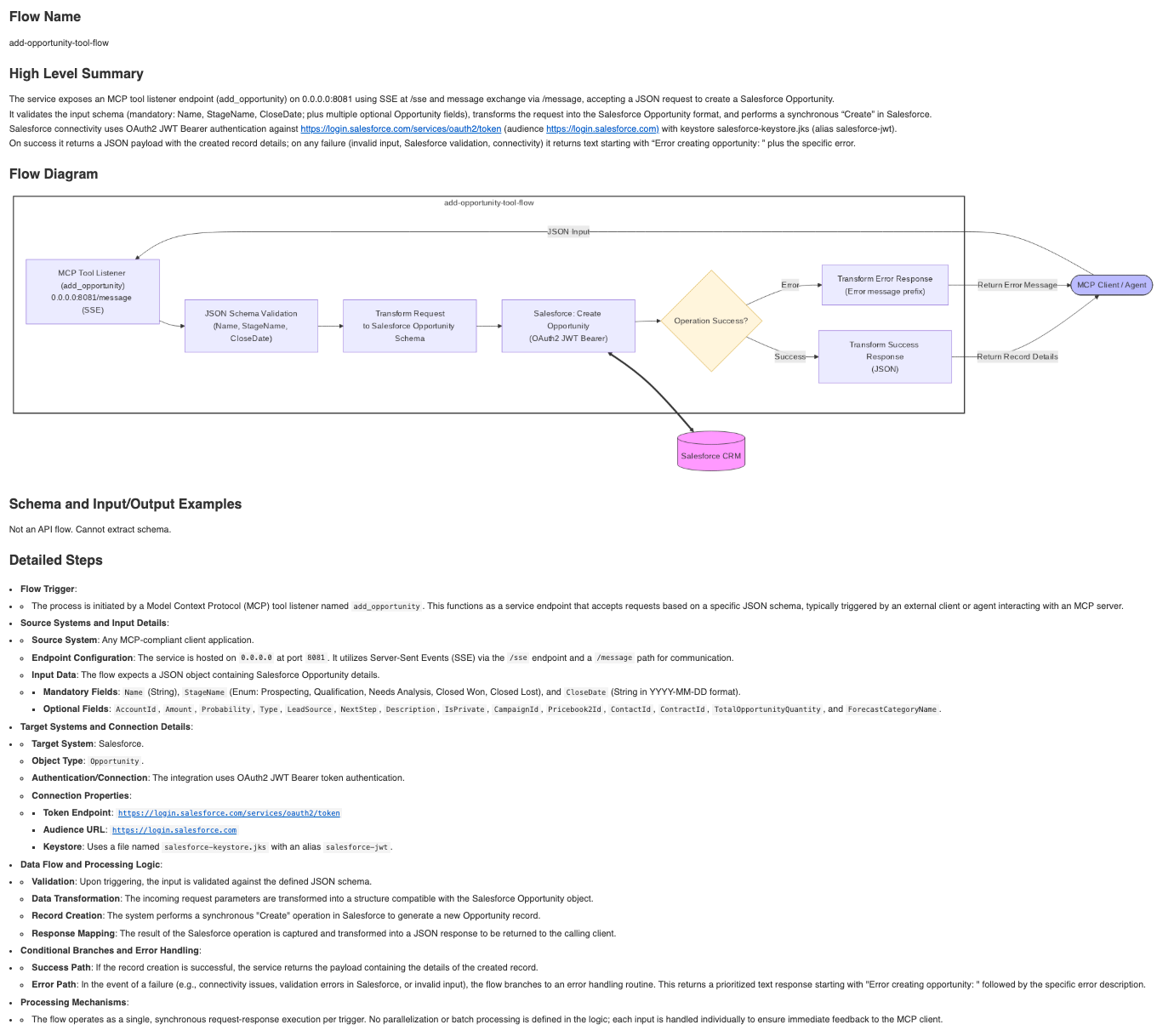
The following section provides a high-level summary of the add opportunity flow, along with detailed steps explaining how the flow is triggered, the source and target systems, and configuration and input details. This ensures that even the smallest aspects of the flow are clearly documented and easily understood.
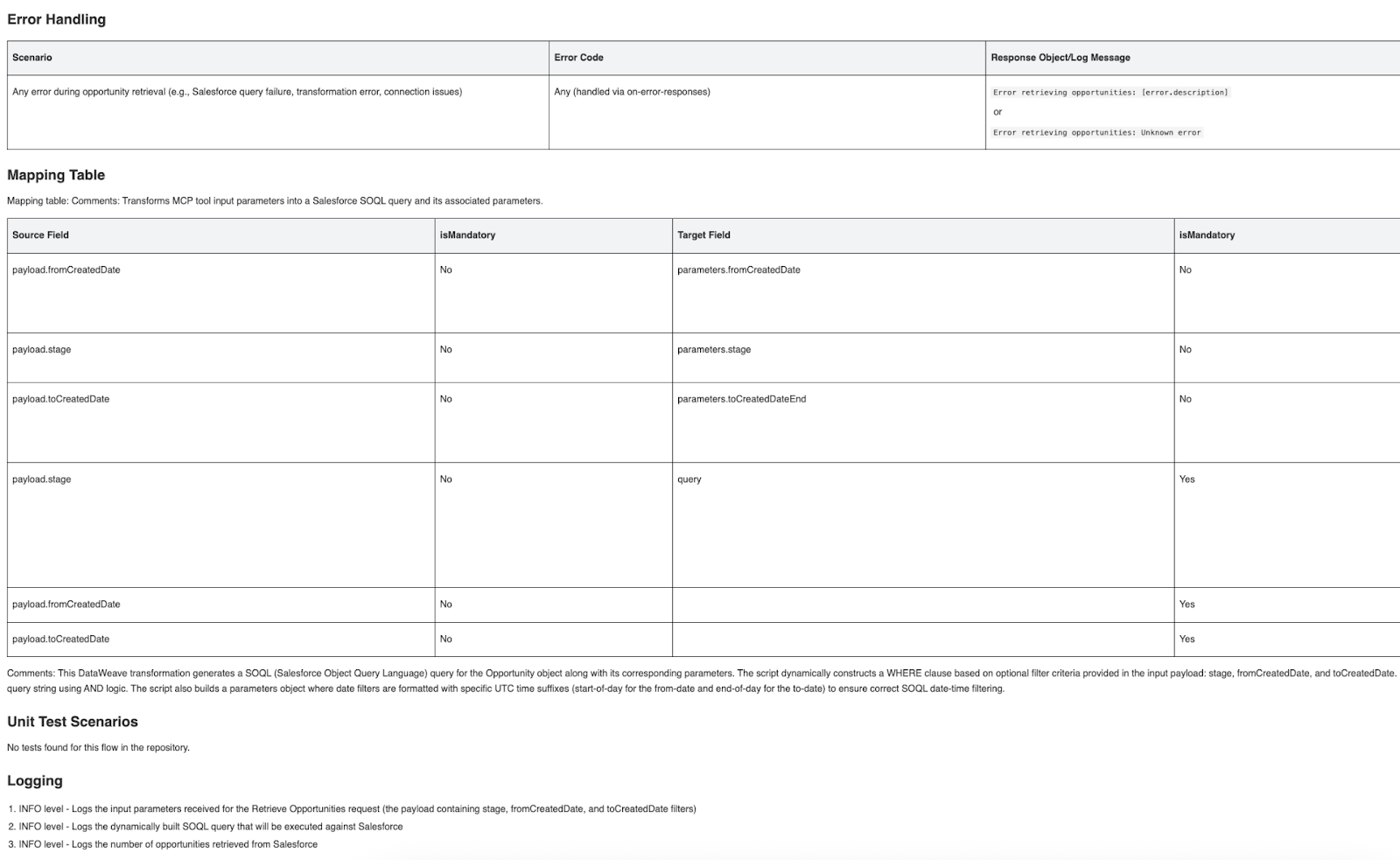
This section documents how errors, data mappings, and operational behavior are handled within the flow. It outlines the error scenarios and corresponding responses, clearly defines how input fields are transformed into Salesforce query parameters, and describes logging behavior for traceability. Together, this ensures that the flow is robust, transparent, and easy to understand, operate, and troubleshoot.
{{banner-large-table="/banners"}}
Conclusion
MuleSoft MCP offers a practical approach to adopting the Model Context Protocol, leveraging existing Mule applications and integration patterns. By implementing MCP servers with MuleSoft, organizations can expose enterprise capabilities to LLM-based applications in a structured and controlled manner.
Understanding the MCP lifecycle helps ensure predictable session management and tool execution. MuleSoft also simplifies the building, deployment, and testing of MCP servers using familiar runtimes and tooling. Enforcing security at session creation and following established best practices helps teams build reliable, scalable MCP implementations.