
MuleSoft Professional Services:
AI-powered Acceleration
The application integration tools market began as a set of solutions for bespoke point-to-point integrations and has matured into API-led connectivity in recent years. MuleSoft has played an essential role in this evolution by enabling organizations to connect applications, data, and tools at scale.
However, as integration platforms have grown more powerful, they have also become more complex. Successful MuleSoft adoption today is less about installing a tool and more about architecting the right integration strategy, governance model, security posture, and delivery approach. This is where MuleSoft Professional Services, delivered by specialized partners and AI coding platforms, becomes relevant.
This article presents criteria for selecting the right MuleSoft service partner based on specific use cases. It also introduces a specialized MuleSoft AI coding platform, augmented with support services, designed to deliver MuleSoft projects faster at a lower cost.
Summary of concepts related to MuleSoft Professional Service partners
{{banner-large-4="/banners"}}
Use cases for engaging a MuleSoft Service Partner
Before getting into the use cases for engaging a MuleSoft service partner, it’s important to clarify why organizations look for one in the first place. On the one hand, it’s the need to develop, maintain, and modernize integrations and APIs–or implement agentic workflows, which is a rising trend. On the other hand, it’s everything else around the integration, such as choosing the appropriate architecture, deploying the MuleSoft platform with the proper network security configuration, and addressing non-functional problems, such as performance issues, that only surface in production. These project requirements can include security and governance controls, performance and scalability expectations, and operational stability.
The use cases below capture the common situations where engaging a MuleSoft Professional Services partner is the practical choice.
With that quick overview in mind, let’s go a level deeper. The sections below walk through the most common MuleSoft scenarios in which a service partner adds value and why these situations tend to require specialized experience.
When the MuleSoft platform needs to be set up “once and correctly”
If MuleSoft is being introduced for the first time, teams usually discover that the hard part isn’t writing the first API but rather setting up the platform so the next 20 APIs don’t become unpredictable to manage. Examples of such decisions:
- CloudHub vs. Runtime Fabric
- environment strategy
- shared assets in Exchange
- certificate handling,
- and deployment automation.
A good partner helps teams avoid common mistakes that only show up later, such as inconsistent environments, broken access patterns, or repeated rework in CI/CD.
{{banner-large-3="/banners"}}
When API-led connectivity is not just a diagram
API-led connectivity is an architectural approach that uses a layered model, i.e., System, Process, and Experience APIs, to connect data to applications with reusable APIs. Many MuleSoft implementations fail because teams try to put everything into a single “mega API” and only realize the problems when onboarding a second channel, such as a mobile application.
This is where the partner’s expertise comes in. This is the stage where the integration work is no longer just about “building an API” but about structuring APIs so they stay reusable as the number of systems and consumers grows. A good MuleSoft partner helps enforce API-led separation, a clean split of responsibilities across three API layers that prevents changes in one area from forcing rewrites everywhere else.
In MuleSoft terms, this separation typically looks like this:
- System APIs: These sit closest to the source systems (SAP, Salesforce, NetSuite, DB, etc.). The goal is pure connectivity and returning a stable response format. This layer should avoid consumer-specific formatting and should not contain business orchestration.
- Process APIs: These sit in the middle and handle business orchestration. This is where multiple system APIs are combined, enriched, and coordinated to complete an end-to-end business flow.
- Experience APIs: These sit closest to the consuming channel (e.g., web, mobile, or partner portal). Their job is payload shaping: returning data in a format that’s easy for the consumer to use without exposing the internal complexity of backend systems.

Shown below are two examples intended to illustrate the impact of API schema design on long-term scaling.
The first is an example of an API payload with a schema that combines a customer ID and their address into a single block.
{
  "cust_id": "123",
  "addr1": "Line1",
  "addr2": "",
  "zip": "560001",
  "status": "A"
}
The second example is a similar payload that captures a customer’s address; however, it’s better designed so that a customer ID can have multiple addresses and a status tied to the customer ID, which can designate a customer as being active or not.
{
  "customerId": "123",
  "address": {
    "line1": "Line1",
    "postalCode": "560001"
  },
  "active": true
}
The example is meant to show that API schema designs are subtle. This is where partners or an AI coding platform with built-in coding best practices can lay a solid foundation for long-term growth, avoiding costly application refactoring in the future.
When delivery involves “real integration complexity”
A MuleSoft integration may look straightforward until it carries real enterprise workloads, including downstream systems that throttle, long-running operations, asynchronous processing, duplicate events, file-based deliveries, or orchestration across multiple systems. At that stage, the challenge is no longer “can we connect system A to system B” but “can we make this integration reliable, scalable, and predictable under production workloads?”
A MuleSoft Professional Services partner typically adds value by bringing patterns that prevent common failures and reduce rework later.
The table below summarizes where integration complexity typically manifests itself.
A very common production issue is a downstream platform returning an HTTP 429 (“Too Many Requests”) response. The wrong approach here is to retry immediately for every failure, which can create a retry storm and make throttling even worse. A better pattern is to retry only when the error is transient and to use backoff to reduce traffic rather than increase it.
Here is a simplified MuleSoft-style logic pattern that teams implement for this scenario:
<try>
    <http:request config-ref="Downstream_HTTP" method="GET" path="/customers"/>

    <on-error-propagate type="HTTP:TOO_MANY_REQUESTS">
        <!-- backoff + limited retry pattern (implementation varies by team) -->
        <raise-error type="RETRYABLE:THROTTLED" description="Downstream throttled the request (429)"/>
    </on-error-propagate>

    <on-error-propagate type="HTTP:TIMEOUT">
        <raise-error type="RETRYABLE:TIMEOUT" description="Downstream timeout"/>
    </on-error-propagate>

    <on-error-propagate type="VALIDATION:*">
        <raise-error type="NONRETRYABLE:BAD_REQUEST" description="Validation failure - do not retry"/>
    </on-error-propagate>
</try>
This kind of “controlled failure behavior” is what separates integrations that only work in testing from integrations that stay stable in production—especially when traffic spikes or downstream systems behave inconsistently. Once again, experienced developers or specialized AI coding tools can help you avoid such mistakes.
When non-functional requirements are strict
A large number of MuleSoft production issues are non-functional—they are interface design decisions such as:
- timeouts
- retries,
- throttling,
- overload,
- and error behavior.
A common requirement is controlling traffic so the backend and runtime remain stable during bursts. MuleSoft teams usually implement this through API Manager policies.
For example, you may want to limit a consumer to 1,000 requests per minute using rate limiting. That decision changes how the API behaves under load and helps protect downstream systems during spikes.
This is the type of requirement that looks like a “configuration switch” but is actually an architectural decision: It affects consumer experience, operational stability, and support workload.
Here are six patterns an experienced partner or an AI platform would use when implementing code:
- Circuit breakers: Implementing circuit breakers prevents cascading failures across the application network by temporarily stopping requests to an unresponsive backend, giving it time to recover rather than overwhelming it with traffic.
- Retry on transient errors: Limit retries to transient errors (such as timeouts or availability spikes) to ensure the runtime allocates resources only to requests likely to succeed, rather than wasting cycles on permanent failures.
- Non-retry for validation issues: Configuring non-retry logic for data validation errors (400/422) enables the API to “fail fast,” providing immediate feedback to the consumer without burdening the integration with requests it cannot process.
- Dead-letter queues: Using a dead-letter queue for poison messages isolates corrupt or unprocessable data for manual analysis without blocking the main processing queue or causing data loss.
- Exponential backoff: Applying exponential backoff when encountering throttling (429) or timeouts dynamically spreads out retry attempts, helping smooth out traffic bursts and preventing the API from being blocked again immediately.
- Maximum attempts on 5xx: Enforcing a maximum attempt limit on 5xx server errors provides a definitive stop mechanism, preventing infinite loops that could exhaust MuleSoft vCore worker resources during prolonged outages.
Migration projects (Mule 3 -> Mule 4)
When you want to cleanly migrate from Mule 3 to Mule 4, you need to account for many factors, including threading, execution model, Java and Groovy scripts, connector version, and error handling. For example, Mule 4 error handling is different by design. In Mule 4, you don’t just catch everything; you define intent, as shown below.
<try>
   <!-- main logic -->
   <on-error-propagate type="HTTP:TIMEOUT">
      <!-- retry or raise custom error -->
   </on-error-propagate>

   <on-error-continue type="VALIDATION:*">
      <!-- return 400 response -->
   </on-error-continue>
</try>
Through recognizing the subtle differences in threading and execution models, an experienced partner of a sophisticated AI platform can implement patterns that prevent obscure production failures. This expertise ensures that your new environment is not only syntactically correct in Mule 4 but also operationally resilient.
Criteria for selecting a MuleSoft professional service partner
Once the decision to bring in external help is made, most teams immediately start comparing partner names. In practice, the better approach is to first understand what kind of support you actually need. Some organizations are starting from scratch with MuleSoft and want someone to set up a strong foundation. Others already have MuleSoft running in production and simply need extra bandwidth to deliver a few integrations faster. And in many cases, the deciding factor isn’t the partner’s marketing deck—it’s your internal capability, how many integrations you need, and whether this is a tactical delivery or a long-term center of excellence.
The criteria below keep the evaluation simple and practical. This table is meant to help you shortlist partners quickly while also making it clear when you might not need a long-term services engagement at all.
{{banner-large-4="/banners"}}
MuleSoft AI coding platform along with support services
At this point, it’s hard to ignore the shift happening across software teams: AI is now touching everyday engineering work, including design, development, code review, and testing. MuleSoft delivery is no different. Whether it’s accelerating DataWeave mappings, reducing time spent on repetitive transformations, speeding up migration work, or creating more consistent patterns across multiple APIs, AI has become a criterion worth considering when selecting a services partner.
So today, when teams shortlist MuleSoft partners, a helpful question is no longer just “How many certified developers do you have?” but also “How do you accelerate delivery and maintain consistency?” That’s where AI-enabled partners stand out, especially those with an established AI practice and who are actively using AI tools in real-world implementations rather than experimenting on the side.
CurieTech AI provides the industry’s leading AI coding platform designed for MuleSoft. Customers can either use the platform on their own or engage CurieTech’s support and professional services team to help them with strategy and implementation.
To illustrate how the AI platform works, here is a screenshot of the CurieTech AI Chat Interface, where you can pass any prompt for coding, enhancing, preparing MuleSoft test cases, documentation, sequence diagrams, or migration activities. This is the “one-stop shop” for all the tools in CurieTech AI.
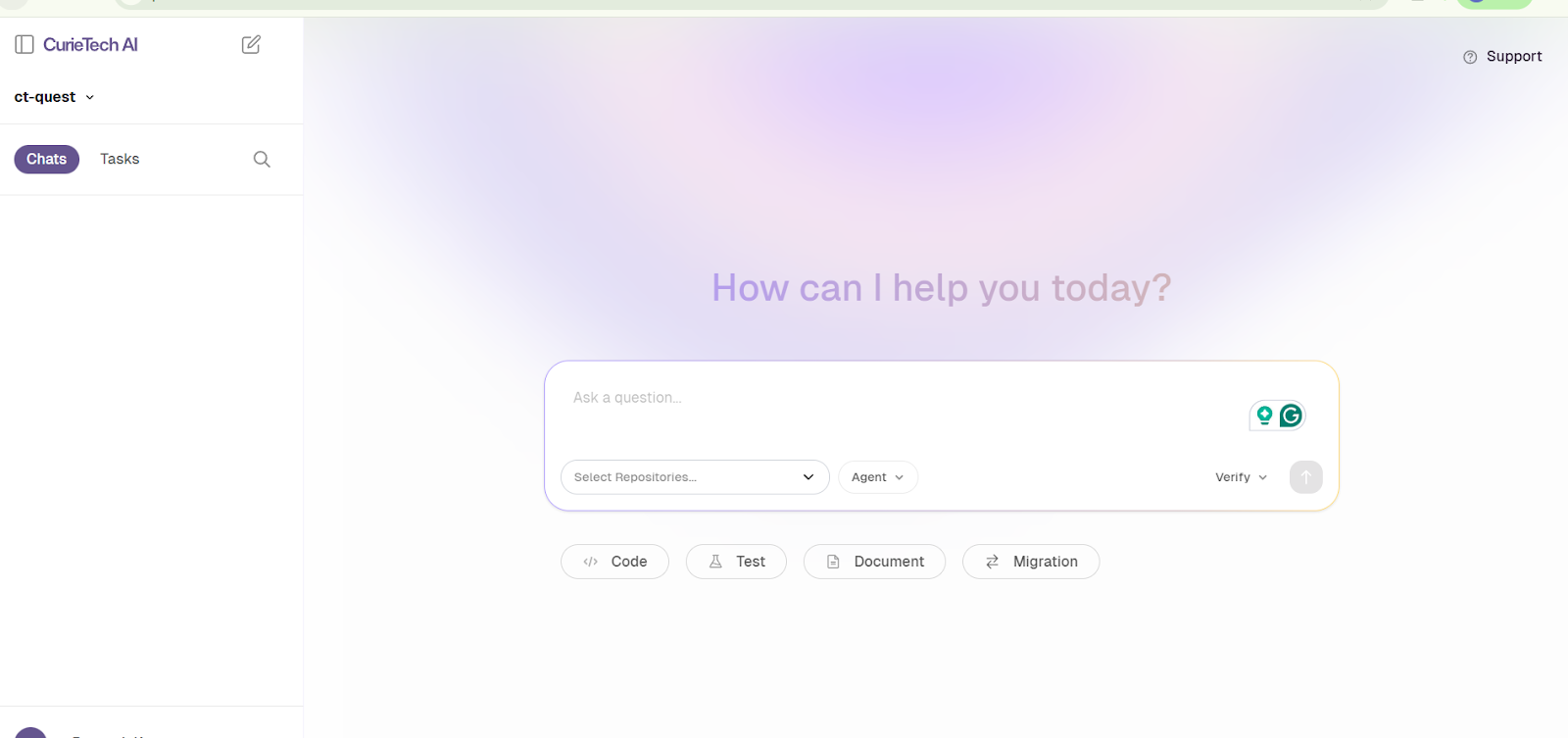
You can ask questions or select from dedicated options (Code, Test, and Document) that are designed to streamline workflows and make AI interactions faster and more efficient. Here’s an example.
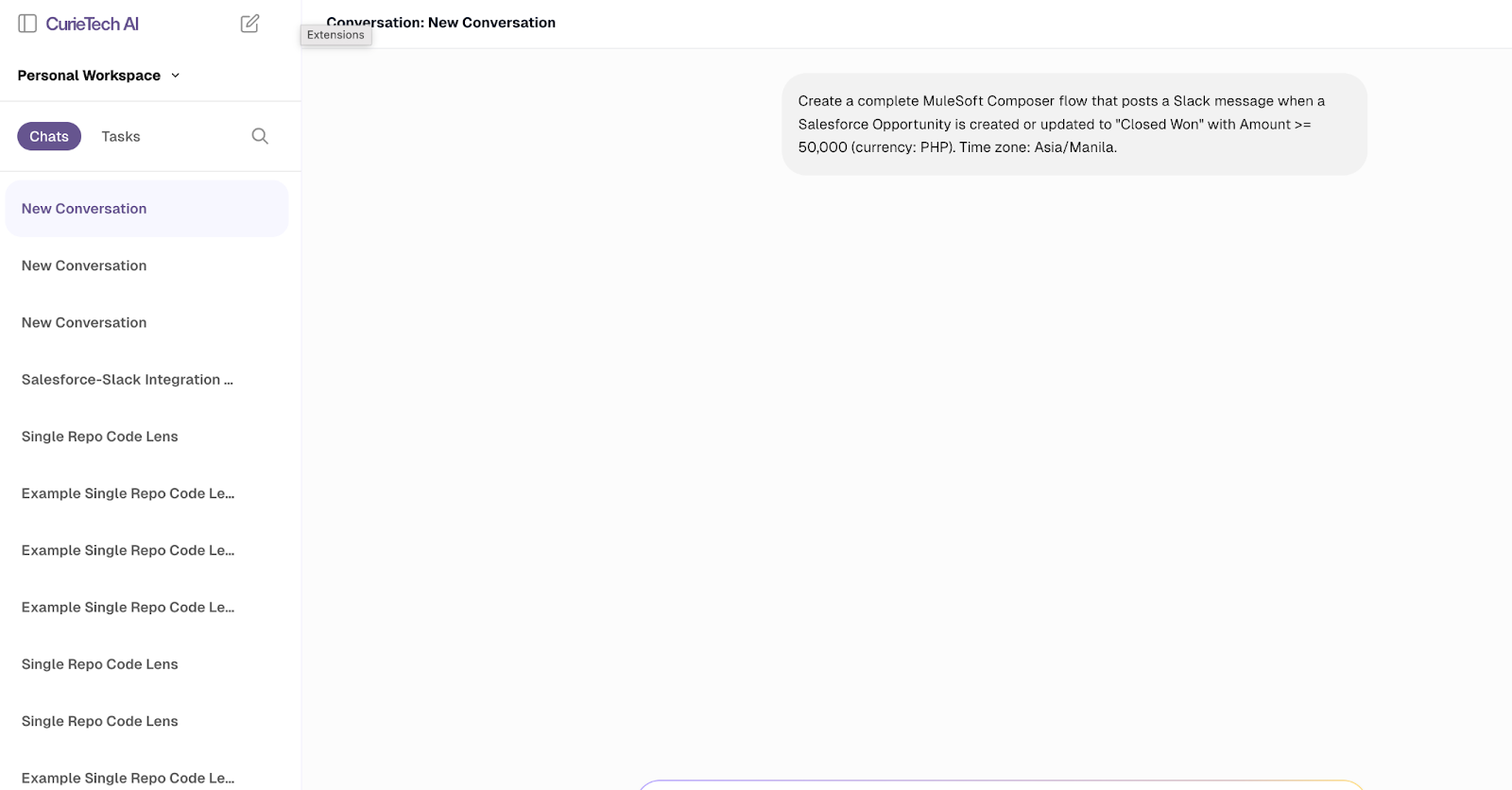
In this scenario, you can prompt the tool to generate MuleSoft Composer code that connects Salesforce and Slack, demonstrating how CurieTech AI simplifies complex integrations by automatically generating ready-to-use code snippets in just a few seconds.
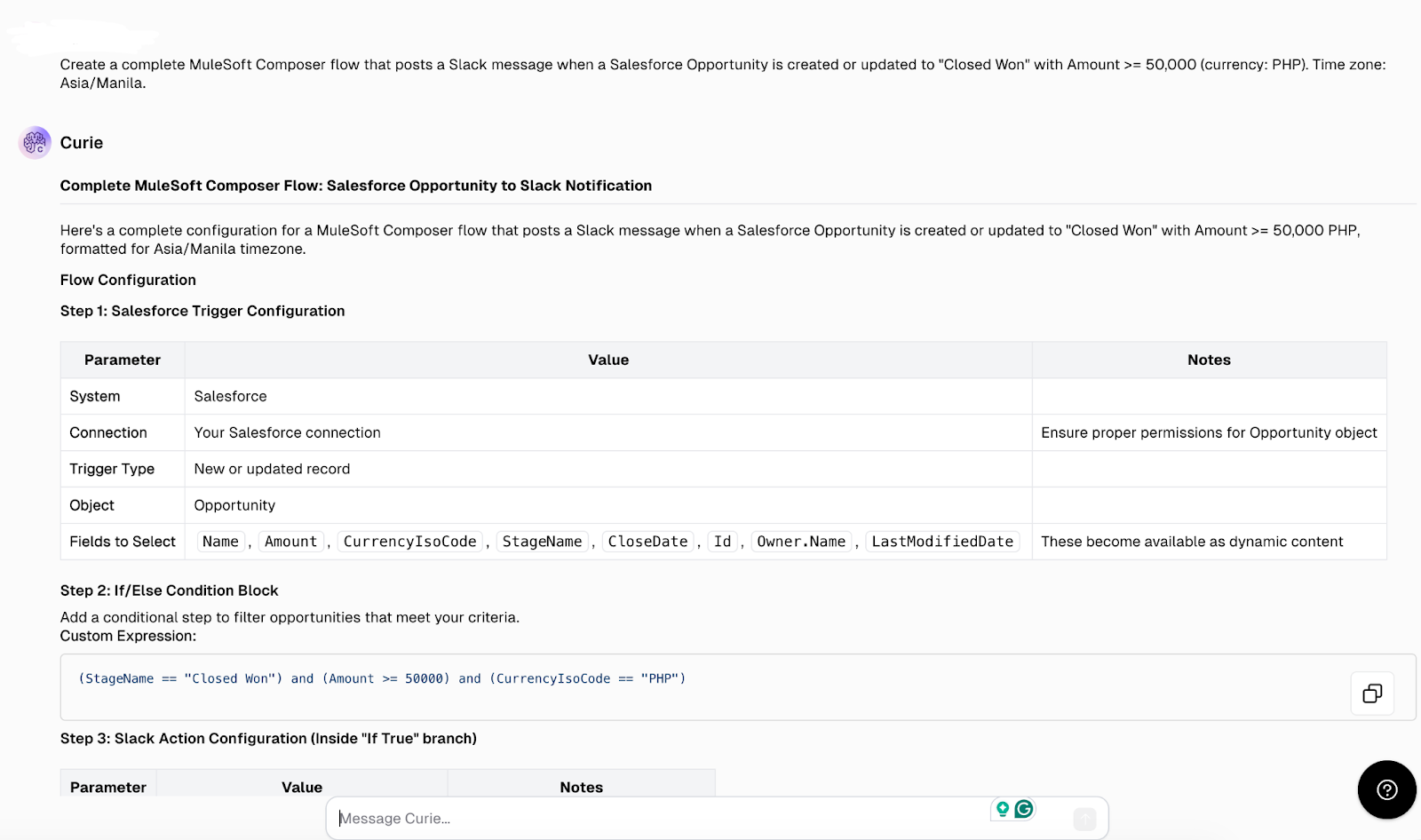
Once a task is submitted, CurieTech AI automatically generates helpful suggestions that both developers and non-developers can use to create low-code solutions in MuleSoft Composer.
The features showcased in the screenshots above represent CurieTech’s “basic skills,” but the company also offers “advanced skills” that perform high-value, complex tasks through multi-step workflows. Here are a couple of examples:
- The platform can upgrade from MuleSoft 3 to MuleSoft 4 and update the documentation accordingly. This involves multiple steps in reviewing the code, updating it, testing, and documenting the results.
- The platform can refactor existing code by taking a simple implementation and rewriting it into a three-layer architecture ready for scaling.
High-level instructions like these represent the next generation of agentic workflow functionality. CurieTech’s system goes beyond producing basic DataWeave code, iterating through a multi-step process to implement a project independently and testing the quality of the final implementation using test cases produced by the AI platform.
Visit CurieTech to learn more.
{{banner-large-table-2="/banners"}}
Conclusion
If you’ve worked on MuleSoft programs long enough, you’ll notice the same pattern repeat: The technology is rarely the problem. The real challenge is designing the architecture and code so you can scale with high performance while maintaining operational consistency.
The right MuleSoft Professional Services partner, or a specialized AI platform provider augmented with support services, can help based on their expertise and experience managing MuleSoft at scale.