
iPaaS Agents: Must-Have Features & Best Practices
Tools like Claude Code are general-purpose code generators that can generate code for a wide range of languages and frameworks from a single prompt. Integration platform as a service (iPaaS) agents take a different approach: They are purpose-built systems designed for developing, testing, and documenting integrations. They combine multiple models, platform-specific knowledge, and runtime validation to produce integrations that compile, deploy, and behave correctly in production.
That distinction is most evident in three areas of the enterprise integration estate:
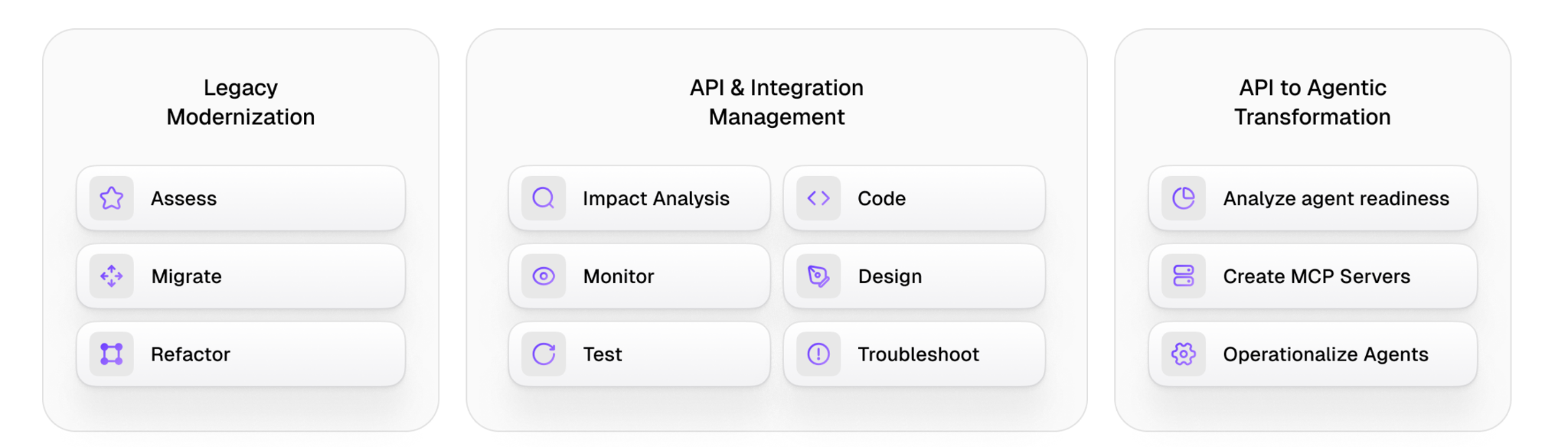
- Legacy modernization, in which iPaaS agents assess, migrate, and refactor integrations running on platforms that have become increasingly difficult to maintain.
- API and integration management, where a fleet of specialized agents covers the full development lifecycle, including impact analysis, design, code generation, testing, monitoring, documentation, and troubleshooting.
- API to agentic transformation, where iPaaS agents analyze agent readiness, generate business-logic-aware MCP servers, and operationalize the custom agents on top of enterprise integration layers.
The following sections examine each of these use cases in detail, along with the architectural reasoning for the performance gap between specialized agents and general-purpose tools in integration work.
This article also provides examples for readers interested in learning how to implement the covered functionalities using a multi-platform agent technology.
{{banner-large-5="/banners"}}
Summary of the must-have features of iPaaS agents
{{banner-small-3="/banners"}}
Why iPaaS needs specialized agents
The latest general-purpose AI agents have come a long way. New models hold more context, reason through trickier problems, and produce code that passes review on many tasks. For a frontend team building a specialized feature or a backend team writing a new microservice, AI agents are good and often perform reasonably well.
Integration work is where things get more complicated. The initial adoption generally starts with a lot of excitement, but as the tasks get more complex, edge cases accumulate, AI agents struggle to retain context, and integration becomes increasingly time-consuming, requiring manual iterations on generated code and constant code cleanup.
A general-purpose model, even a better one, isn’t well-suited for integration work. The limitation isn’t with the model; it's more about what the job actually involves.
The productivity illusion
The early reaction from integration teams using general-purpose AI tools is almost always positive. Code gets written faster, more flows ship in a sprint, and engineers will tell you they feel about 20% more productive.
What's harder to know is the downstream cost. Recent benchmark data points to general-purpose AI-generated code carrying roughly 23% higher bug density, review cycles extending by about 12%, and a measurable drop in quality once AI-generated content exceeds 25-40% of the codebase. [Source]
The productivity gain is real in the initial phase, but most of it is reabsorbed later in defect remediation, regression work, and incident response. From an architectural standpoint, the pattern is familiar; the tools that are fastest to adopt are not always the ones that lower the total cost of ownership.
Integrations are not a context-free coding problem
The reason that this issue lands harder on an integration team than, for example, a product engineering team building a new screen is that integration work is fundamentally not code-first. Code is just one part of the larger engineering problem. The substantive work sits underneath it, in platform behavior, data contracts, business rules, error semantics, and a long history of decisions made for specific reasons and not documented.
A model can read an OpenAPI specification and schemas. What it cannot reliably reason about is integration-specific context. For example, a given CRM can treat empty strings as semantically distinct from nulls, finance systems may truncate identifiers at fixed widths to remain compatible with legacy records, or a connector's retry policy might have been originally tuned for an upstream system that no longer applies but still governs production behavior. These are the kinds of decisions that determine whether an integration is correct and, more importantly, whether it works with all upstream and downstream systems. They are rarely present in the artifacts that an AI tool can read.
Even a straightforward integration, such as synchronizing CRM and ERP systems, is not as simple as the requirement suggests. For example:
- Pagination behavior can be inconsistent across endpoints and needs to be handled on a case-by-case basis.
- Null values and missing fields are distinct conditions, and downstream systems often interpret them differently.
- Deduplication logic depends on establishing a clear system of record for each entity.
- Currency conversion might require a rounding policy to maintain financial accuracy, and date handling must account for time zone transformations to avoid discrepancies across integrated systems.
The risk areas also differ from those in typical application development. When integration logic is slightly wrong, it doesn’t produce a visible failure. The flow continues to run, and payloads still validate, but the data simply diverges from what the business expects, and the discrepancy is usually identified days later through downstream reporting or reconciliation. By this point, the issue's impact is much larger.
A single model cannot deliver the full pipeline
Even setting the context aside, integration delivery is not a single-task problem. It's a multi-stage process involving requirements analysis, mapping, transformation, validation, deployment, and post-deployment troubleshooting.
Each stage has different problems to tackle. Design and reasoning tasks benefit from deeper, slower models. Routine code generation rewards speed and cost efficiency. Validation isn't a coding task at all; it requires execution against a real runtime to determine whether the output is correct.
This is evident in the benchmark results. General-purpose tools reach 40-50% first-time accuracy on integration tasks. This gap cannot be closed by improving prompts. It stems from the base mismatch between the work and the design of a single-model system.
Specialized iPaaS agents are built around this principle. They route different stages of the work to the most appropriate model, incorporate platform-specific knowledge, and validate the output against the runtime environment where the code will actually execute. On the same benchmark sets, that architectural difference is the gap between general tools sitting in the middle of the distribution and specialized agents clearing 90%+ first-time success. Smarter underlying models don't drive the improvement. It comes from a system designed end-to-end for the work it's tasked with.
The takeaway is not that integration teams need better AI; they need a different kind of AI architecture. One that recognizes integration work as a system of connected decisions rather than a single coding task. The sections that follow look at where this difference matters most in practice. Each focuses on a part of integration work that has been hard to scale, and where specialized agents change the delivery outcome in measurable ways.
Use Case 1: Legacy modernization
Many enterprises continue to operate at least one outdated integration platform that needs to be modernized. For example, TIBCO, webMethods, IBM ACE, and BizTalk continue to run mission-critical workloads across financial services, healthcare, manufacturing, and the public sector. They remain in place because they function and because the cost of replacement is generally higher than the cost of continued operation.
That calculation is harder to justify with each passing year. The talent pool for these platforms has been shrinking for some time, and the engineers who still know them well aren't always available or affordable when a project actually needs them. Vendor support is either gone or on its way out, depending on the platform. Internal teams spend more on maintenance every year and ship less in return. What used to be a postponable line item on the modernization roadmap is now appearing on enterprise risk registers.
The usual response to modernizing integration systems has been to engage a system integrator. A multi-quarter program includes a consulting team billed on a time-and-materials basis with delivery through manual rewrite and validation. The approach is functional, but the economics are difficult to manage, and migration timelines are hard to forecast. Quality varies meaningfully between developers. The T&M billing incentive structure tends to extend, rather than compress, engagements.
iPaaS agents change the economics of modernization by replacing the labor-intensive parts of migration with consistent, repeatable automation. The work breaks down into three phases.
Phase 1: Assessment
The first phase is discovery. Agents read the source platform at the code level and build a complete migration inventory. This covers integration flows, data transformations, the connectors in use, error-handling patterns, and dependencies between flows. Anything that runs in the source environment is captured.
The output is a concrete scope, not a high-level estimate that matters for program planning. As the scope is based on the actual source code, it is much easier to create budgets, priorities, and sequences.
Phase 2: Migration and refactoring
In the second phase, agents generate the full set of target-platform code. The important point is that this is not a like-for-like rewrite. Legacy integrations tend to collect point-to-point patterns over many years, which do not fit well with a modern target architecture. Agents can refactor as they migrate the code from the legacy to the new platform. Point-to-point flows are reorganized into clean layered designs. Shared transformation logic is consolidated. Connectors are standardized to the patterns accepted by the target platform.
This is where most of the lasting value is created. A migration that simply ports legacy patterns onto a new platform inherits the technical debt from the legacy platform. Refactoring during migration removes that debt as part of the same effort, rather than leaving it for the next phase of the project.
Phase 3: Integration testing
The third phase is validation. Automated agents can test data flows, business logic, and integration correctness in the new environment. Defects are surfaced before integrations are promoted to higher environments, which changes the risk profile of the entire program.
This is also where iPaaS agents are most useful. Manual integration testing on a migration of any meaningful size is expensive and slow, and it often lacks detailed coverage. There are too many edge cases for human testers to cover within reasonable timelines, and the gaps often only surface after the new platform goes live. Automated validation closes those gaps before the new platform takes production load.
What this delivers
iPaaS agents deliver measurable outcomes in approximately half the time and at half the cost of a comparable integration engagement while significantly reducing defect rates. The improvement does not come from agents being more capable than experienced developers; in fact, it results from removing inconsistency from the rewrite process.
When the same source pattern is migrated the same way every time, project plans become predictable rather than aspirational. For an architect responsible for a multi-platform modernization roadmap, that predictability is frequently more valuable than the cost reduction itself.
This is the problem CurieTech's Migration agents are designed to solve. CurieTech applies the specialized-agent model across the integration lifecycle, with each stage handled by an agent built for it.
Migration is decomposed into a set of well-defined activities, each handled by a specialized agent that applies the same analysis, generation, and validation logic across every asset it touches. The diagram below summarizes CurieTech's migration agents.
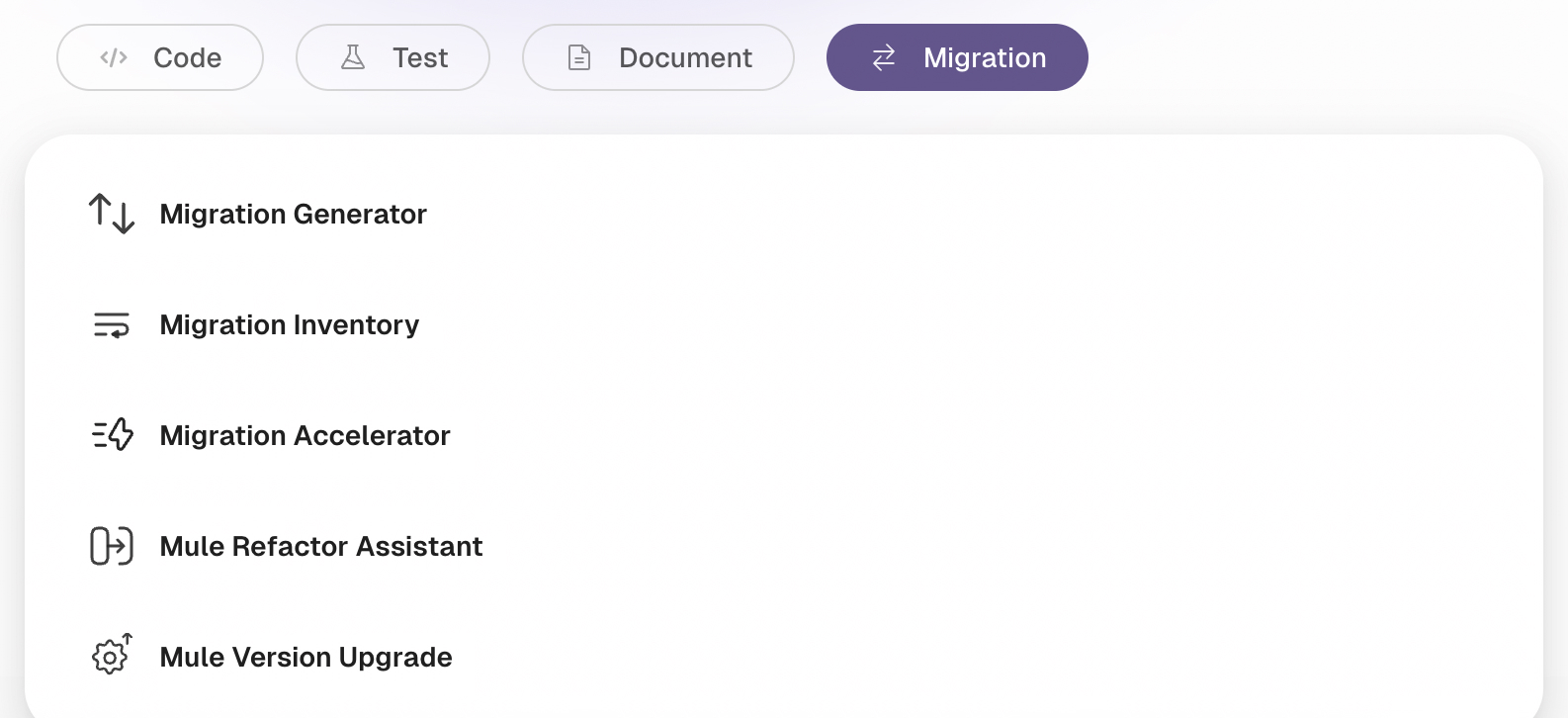
The following example uses the Mule Version Upgrade agent to update dependencies and runtime version, and to adjust the flow code and DataWeave transformations, using a simple prompt.
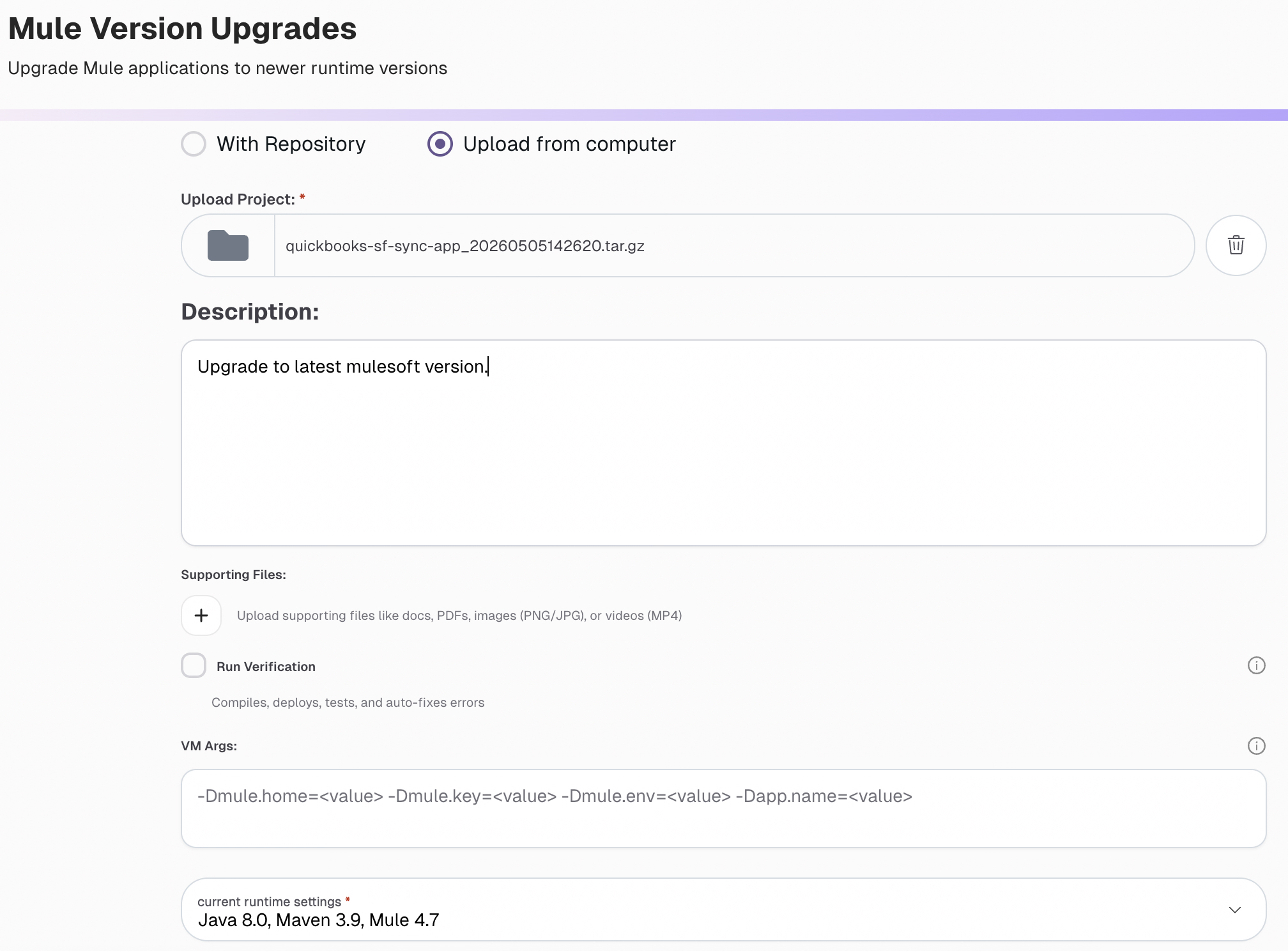
The agent creates a task for Mule version upgrades and executes it end-to-end with minimal supervision. This reduces upgrade risk and manual effort by validating compatibility, applying required fixes, and producing a stable Mule 4.9/Java 17 build.
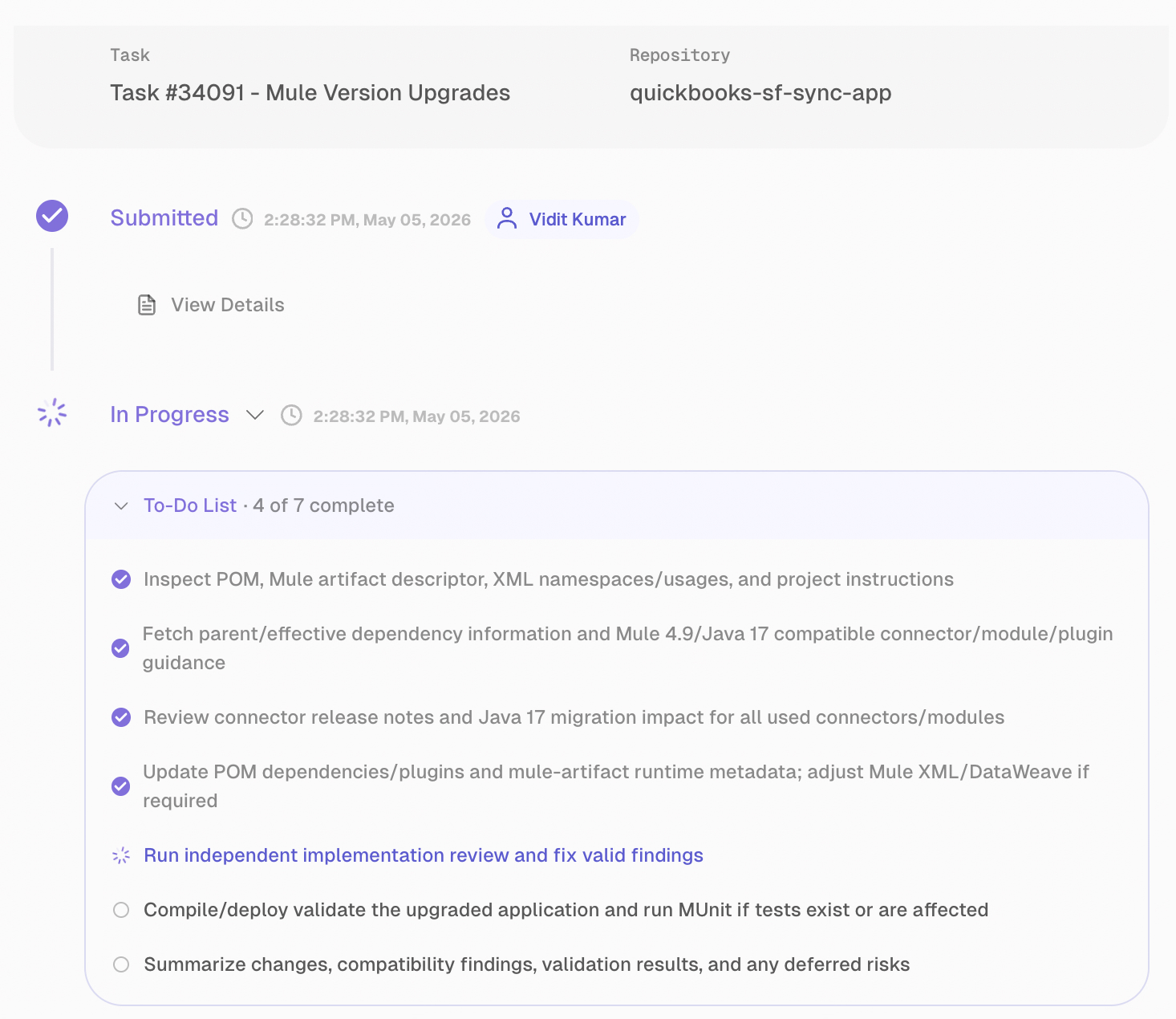
The agent reviews the project's POM, Mule descriptors, and XML namespaces. It checks the compatibility of the connector and plugin with Mule 4.9 and Java 17. It goes through the release notes for breaking changes, updates dependencies and runtime metadata, and makes adjustments to the affected Mule/DataWeave configurations.
The agent also carries out a separate implementation review to identify and resolve any valid issues. Finally, it confirms the upgrade by conducting build, deploy, and test checks before offering a clear summary of changes, risks, and compatibility results. This boosts release confidence by catching defects early, demonstrating upgrade stability through real validation steps, and providing stakeholders with clear evidence to make decisions about going live.
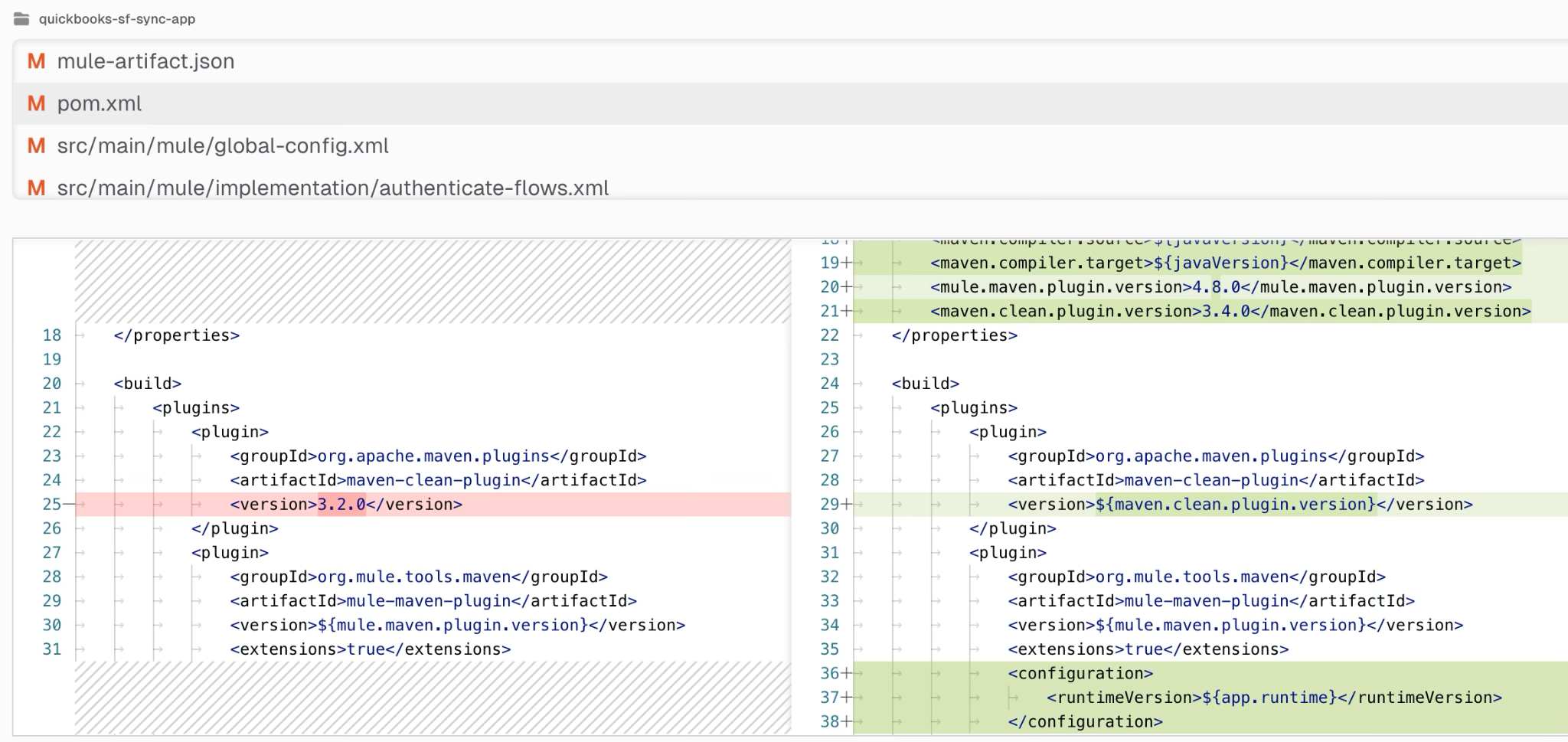
After completing the migration task, CurieTech provides the code changes for review and feedback. This helps because it keeps humans in control of quality and risk: Teams can verify what changed, suggest refinements, and approve only when the migration aligns with technical and business expectations. It also improves transparency and trust by making the agent’s work auditable before production release.
Use Case 2: API and integration management
Modernization tends to attract leadership attention, but it is not where most integration teams spend most of their time. The bulk of integration costs in an established enterprise lies in the ongoing software development lifecycle, including requirements gathering, building, unit testing, integration testing, code review, and production troubleshooting. The work is operationally critical, and it is where the integration operating budget actually goes.
The traditional sourcing model for this work has been a managed services contract with an integration partner. The team is billed by the hour and is often distributed across geographies. The structure has known limits, as costs are hard to forecast and quality depends heavily on the individuals assigned to a given engagement. Most engagements focus on builds, leaving testing, documentation, and ongoing maintenance to internal teams.
A specialized iPaaS agent fleet covers the lifecycle differently. Instead of having a single agent handle everything, the architecture deploys purpose-built agents at each stage.
Phase 1: Define and design
The first phase turns business requirements into clear integration specifications. Specialized agents understand the requirement, identify the systems involved, and produce a specification that the build team can work from.
This catches ambiguity at the start. In a traditional cycle, ambiguity in requirements usually does not surface until significant effort has already been invested, when developers realize that the original ask did not capture the complete business process. Tackling such challenges later in the project becomes very difficult, but specialized iPaaS agents make it easier and more transparent.
Phase 2: Build and test
The second phase covers the code and the tests that prove that the integration works. Build agents generate the integration logic from the specification. Unit test agents create the matching tests in the same workflow. First-time accuracy on routine work usually lands above 90%.
Integration test agents go further. They create test suites that exercise behavior between systems, not just within a single flow. This matters because most production incidents in integration environments come from how systems interact with each other, not from bugs inside a single component. The boundary between the systems involved in the integration is where the most defects arise, and that is where these agents focus.
Phase 3: Review and maintain
The third phase covers what happens after the code is written. Code review agents enforce company standards within the CI/CD pipeline. Since the rules are encoded in the agent, every review uses the same checks with the same quality, no matter who submitted the change.
Troubleshooting agents take on the production support work. They analyze error states, correlate logs, and propose corrective actions. This shortens the cycle between an incident being raised and a working fix being deployed.
What this delivers
The architectural value of this model ensures uniform lifecycle coverage. Build quality stops depending on which developer picked up the ticket. The surrounding stages, including testing, review, and troubleshooting, achieve the same level of quality and reliability as the main build.
For organizations with a large number of integration workflows, that uniformity makes long-term maintenance work feasible and scalable. It also makes governance, including C4E standards and API-led design conventions, enforceable in practice, especially as the integration codebase grows.
Using CurieTech AI for building new integrations
Curie provides a set of agents that can build efficient, scalable integrations that follow design conventions and standards. This example uses CurieTech AI to build order-processing APIs for creating, updating, retrieving, and canceling orders as an Azure Logic Apps standard project.
Curie can be used to generate the prompt, capturing all requirements in detail, including API endpoints, involved systems, security configuration, business process logic, and error handling.
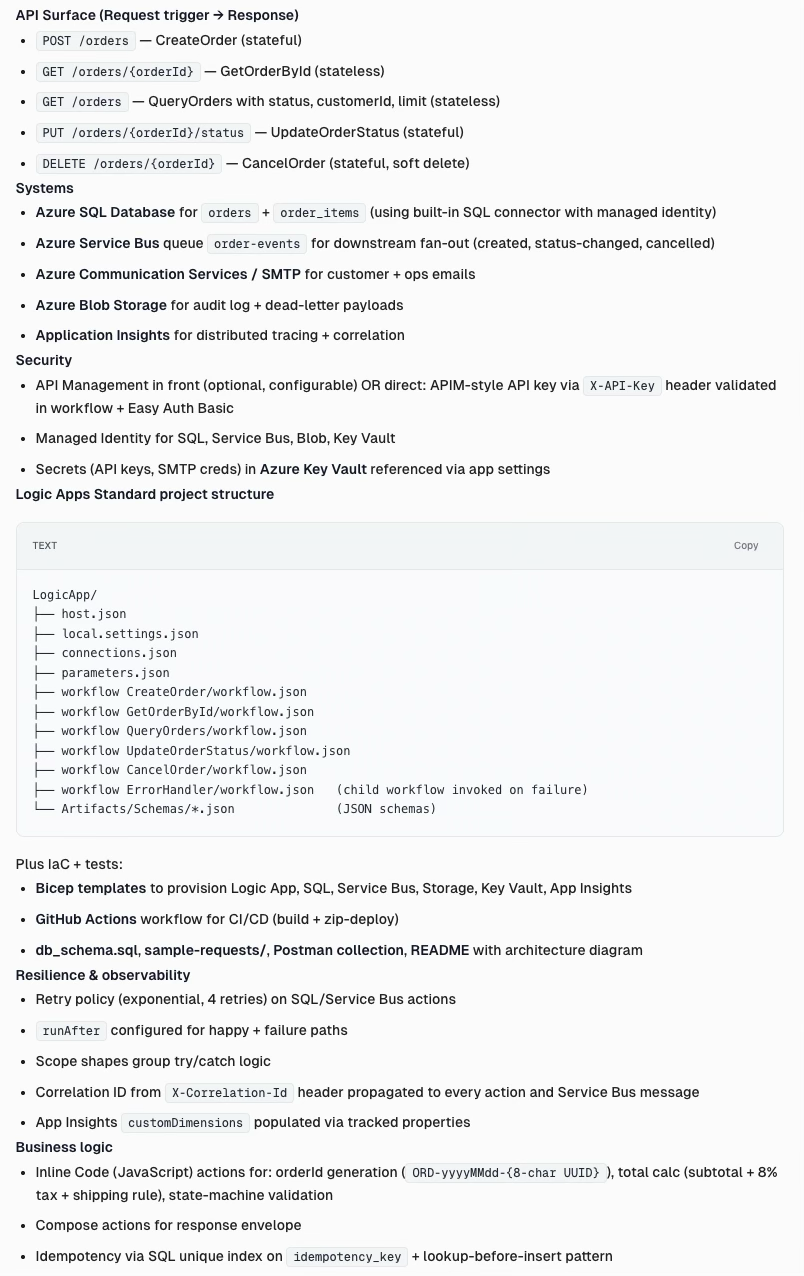
The agent builds a complete project, including all workflows, configurations, and business logic.
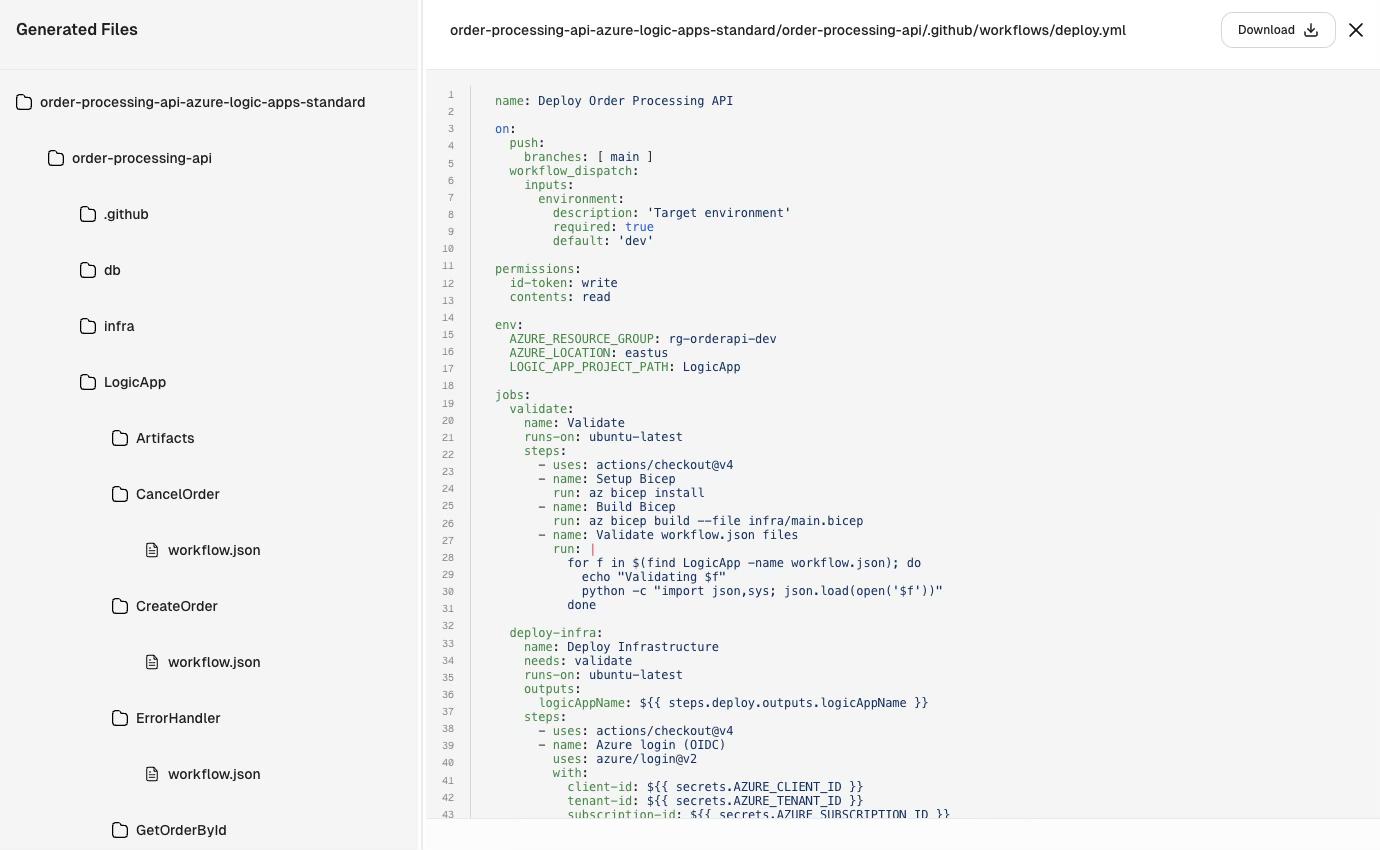
The agent autonomously generates a complete, production-ready Azure Logic Apps Order Processing API project that includes:
- Workflows: Stateful and stateless Logic Apps workflows with validation, state-transition enforcement, soft-delete handling, centralized exception processing, retry policies, and operational alerting.
- Connections: Built entirely using native Azure service-provider connectors, including Azure SQL, Service Bus, Azure Blob Storage, and SMTP for improved performance and lower operational cost.
- Infrastructure-as-code: Complete Bicep deployment stack for Azure Logic Apps Standard, WS1 hosting plan, Azure SQL, Service Bus, Storage Account, Key Vault, Application Insights, and Log Analytics with RBAC and managed identity support.
- Security: API-key authentication, Key Vault secret references, RBAC-enabled access, managed identities, secure configuration handling, and correlationId propagation across workflows.
- CI/CD: GitHub Actions pipelines with OIDC federated authentication supporting validate, deploy-infra, and deploy-app stages for automated deployments.
- Observability: Structured logging, Application Insights integration, KQL monitoring queries, dead-letter handling, troubleshooting guidance, and centralized operational alerts.
- Deliverables: Logic Apps workflow definitions, Bicep templates, db_schema.sql, sample request payloads, Postman collection, README with Mermaid architecture and state diagrams, KQL queries, and deployment/troubleshooting documentation.
Use Case 3: API to agentic transformation
Enterprises are investing heavily in agent-based applications with the expectation that these agents will take real action across enterprise systems: creating tickets, updating records, provisioning resources, executing workflows, etc. These actions do not happen inside the language model, though. They happen in the integration and middleware layer, behind the business logic, validation rules, and operational constraints.
Three structural problems make this hard. The business logic is hidden within the integration code rather than documented anywhere. The middleware estate is usually fragmented across several platforms, each with its own patterns. And mapping existing APIs to agent-ready capabilities by hand is slow because it requires deep expertise in every platform involved.
The default approach: Wrapping APIs as MCP tools
Most teams start with the obvious answer: generating Model Context Protocol (MCP) servers directly from existing OpenAPI specifications. Every endpoint becomes a tool. The agent has access to the full API surface and is expected to compose calls as needed.
This approach degrades quickly in production. A simple request like “assign this ticket to John” becomes a multi-step orchestration. The agent must look up John's user ID, resolve the project context, and then validate permissions. Only then can it issue the assignment call.
Each step is a point at which a probabilistic system can drift. Identifiers can be hallucinated. Standard HTTP errors can trigger loops, resulting in increased token usage. The agent ends up acting like a junior systems integrator instead of a task-level worker.
The architectural fix: Business-logic-aware MCP servers
The correction is to make the MCP servers business-logic-aware. Instead of exposing low-level endpoints, the server exposes intent-driven actions, for example: assign_ticket_to_user(user_name, project_name, ticket_id). This becomes a single capability. The server resolves the user and project and applies the validation rules. Only the agent's intent crosses the boundary. The orchestration completely runs on the server, and the agent operates at the level of intent. The system handles the complexity that systems are designed to handle.
This shift has practical consequences. Workflows that used to require four or more dependent calls are consolidated into a single call, reducing failures and limiting token usage.
A server that understands business logic can provide a response like “User 'John' not found in Engineering. Did you mean 'John' in Product?” instead of a simple HTTP error. The agent can fix its mistakes instead of trying again without any context. You can add checkpoints for actions that require approval, and sensitive information remains on the server rather than being returned to the agent's context.
Why specifications alone are not enough
API specifications explain the structure and show endpoints, request and response schemas, authentication, rate limits, parameters, and protocol details. That information is helpful, but it is not enough to build a reliable MCP layer on top of it.
What really matters is in the code. Code-level analysis reveals the business rules, data transformations, error-handling patterns, integration dependencies, platform-specific behaviors, and orchestration workflows that decide how a request moves through different systems.
A general-purpose tool reading an OpenAPI spec sees the surface. By reading the underlying integration code, a specialized iPaaS agent sees what the system actually does. That gap is the difference between an MCP server that works in a demo and one that holds up in production.
A typical transformation engagement
An API-to-agentic engagement comprises three phases.
Phase 1: Agent readiness assessment
Specialized agents inspect the middleware platforms and integrations at the code level. The output is a blueprint that identifies which capabilities can be exposed agentically, which need to be refactored first, and which should remain internal. This phase turns the idea of making the existing APIs agent-ready into a concrete plan with actionable items.
Phase 2: MCP server creation
Once the blueprint is ready, you can create enterprise-grade MCP servers from it. These servers present existing integrations as intent-driven actions. The business logic stays on the server and is not transferred to the agent. Features like data normalization, error handling, and human-in-the-loop checkpoints are included from the beginning.
Phase 3: Custom agent operationalization
In this phase, agents are built and designed for specific business use cases. These agents connect to the new MCP servers and other systems. They are then deployed into production. The result is a group of agents that operate within real enterprise systems, adhering to the constraints and validations that the business already depends on.
What this means in practice
The architectural principle remains the same: API specifications define the structure, and business logic stays in the code. If the MCP layer is created only from the specification, the resulting agents will function at the level of a junior developer without any context about the organization. If the MCP layer shows what the integrations really do, the agents become reliable tools the business can trust to make the decisions they intend for them to make.
For organizations investing in agentic applications, this is the use case that determines whether those applications will work in production.
What specialized iPaaS agents look like in practice
A specialized iPaaS agent platform organizes the work by lifecycle stage rather than by model. CurieTech is one of the more developed examples, a set of specialized agents that operate across the integration lifecycle, with each agent assigned to the stage for which it was built.
Instead of using a single model for every task, CurieTech assigns different stages of the work to different agents. Every agent is built around the problem it solves. The table below summarizes what each one does.
The agents are designed to cover the integration lifecycle end-to-end rather than a single stage. In practice, this means they support requirements through to ongoing maintenance, including modernization programs, the creation of MCP servers for agent-ready integrations, and runtime troubleshooting.
They also operate inside the environments that integration teams already use. The agents run natively in Anypoint Studio and Visual Studio Code, and connect to Jira, Confluence, and Git, so each task is executed in the context of existing tickets, documentation, and source code. This keeps every step easy to review, audit, and approve through processes the team already has in place.
{{banner-small-3="/banners"}}
Conclusion
The integration landscape is changing, though not for the reasons that most evaluations assume. Smarter models do not drive the change; rather, it is driven by better systems built around them.
Generalized AI coding tools will continue to improve and deliver real value across a range of engineering tasks. Integration work is not one of those tasks. There are too many moving parts. Platform behavior, business logic, runtime validation, and institutional context all matter, and none of them are solved by a better prompt or a larger context window. Integration is a system problem, and it requires a system to address it.
That is what specialized iPaaS agents provide. In legacy modernization, they replace unpredictable code rewriting with pattern-based migration, typically in half the time and at half the cost. In API and integration management, they cover the entire lifecycle with consistent quality, eliminating the inconsistencies introduced by traditional managed services. In API-to-agentic transformation, they enable the creation of MCP servers that reflect what integrations actually do rather than only what their specifications describe.